Book a 30-Minute Call With Our Certified Consultant
Connect directly with our accredited consultant to get clear answers on
your HubSpot underutilized features, integrations, reporting and automation.
In this Consultation, you can discuss:
HubSpot Consulting Needs
Custom Automation Plan
How to build AI agents in n8n is becoming one of the most searched topics among technical and non-technical teams exploring automation. Companies are experimenting with conversational bots, decision-making assistants and AI-powered workflows that operate without human intervention. The rise of workflow-based automation platforms has made this possible without writing extensive code. One such platform n8n offers powerful n8n integrations that connect AI models, CRMs, ERPs, communication tools and third-party APIs into fully automated intelligent agents.
What is the best way to build AI agents using n8n?
AI agents in n8n work by combining triggers, workflows and external LLM APIs to automate decisions and actions.
Why Businesses Are Turning to n8n for AI Agents
Most companies experimenting with AI face similar challenges:
Developers struggle to integrate LLM APIs into CRMs and ERPs.
Leadership teams need AI workflows that prove ROI fast.
Data teams want automation without major infrastructure changes.
Sales and support departments need agents that perform actions not just reply with text.
n8n resolves these frustrations by connecting business applications, AI models and triggers into repeatable automation logic.
Real People, Real Problems n8n AI Agents Solve
Scenario 1: The Support Team That Never Sleeps
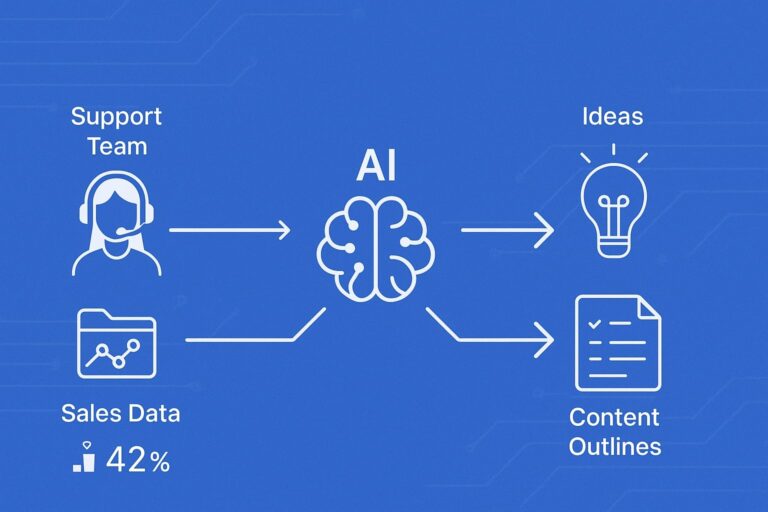
A SaaS company receives repetitive billing questions at 2 a.m. Their team is exhausted from late-night shifts. Using n8n, they deploy an AI agent that reads tickets, classifies intent and shares accurate responses based on their knowledge base. Within 30 days, tickets per agent drop by 42%.
Scenario 2: The Sales Director With Data Blind Spots
A manufacturing firm stores quotes in HubSpot and order history in ERP. Their sales team wastes hours manually syncing accounts. The AI agent reads CRM data, updates deal notes, scores leads and suggests next actions all triggered when a deal hits a certain stage.
Scenario 3: The Marketing Manager Who Struggles With Content Consistency
They have ideas but no time. An AI agent compiles briefs, checks tone, validates keywords and generates content outlines. The manager gains five hours per week.
These examples show why learning how to build AI agents in n8n creates measurable operational advantages.
Understanding AI Agents in n8n
An AI agent in n8n is a workflow that:
Receives a prompt, trigger or input
Processes data using an AI model (Gemini, GPT, Claude, etc.)
Interprets the result
Takes an automated action such as sending a message, updating a CRM property or making a recommendation
n8n acts like the brainstem linking APIs, context and business data so AI can execute tasks, not just provide answers.
How to Build AI Agents in n8n (Step-by-Step)
Step 1 — Set Up Your n8n Environment
You can use n8n Cloud or self-host. Cloud requires no DevOps effort and is ideal for beginners, while advanced users may self-host for customization and control.
Step 2 — Identify the Agent’s Objective
Examples:
Auto-reply to support tickets
Score leads based on CRM data
Produce product descriptions for ecommerce
Analyze logs for security anomalies
Avoid vague goals. AI agents are effective when their task is specific.
Step 3 — Add Triggers
Triggers define when the agent acts:
Trigger Type
Example
Webhook
AI responds to a new chat message
Cron
Summaries generated nightly
App Trigger
HubSpot deal moved to “Qualified” stage
Triggers transform agents from passive tools into proactive workers.
Step 4 — Connect to a Language Model
n8n supports LLMs through native nodes and community nodes.
Popular choices include:
OpenAI GPT-4 / GPT-o
Anthropic Claude
Google Gemini
Azure OpenAI
Each model has strengths select based on cost, text complexity and context length.
Step 5 — Build the Agent Reasoning Logic
Use:
IF nodes for conditional execution
Function nodes for transformations
Memory nodes for context persistence
Database nodes to retrieve information
This logic makes your agent act based on data not just generate text.
Step 6 — Execute Tasks Automatically
Your agent should:
Log activities
Update CRM fields
Notify teams
Respond to inputs
Store outputs
Without action nodes, your AI is only a chatbot—not an AI agent.
How to Build AI Agents in n8n for Beginners
If you’re new to automation, start with a simple goal:
Example starter workflow:
Trigger → LLM Node → IF Node → Email Node
This lets your agent read input, decide its classification and send emails based on sentiment or topic.
Beginners should avoid complex branching until they understand how nodes pass data and store metadata.
How to Create AI Agents in n8n With Business Context
Real power comes when agents use structured data:
CRM actions (HubSpot, Zoho, Salesforce)
ERP workflows (NetSuite, Acumatica, Odoo)
Ticketing data (Zendesk, Freshdesk)
Communication messages (Slack, Teams, WhatsApp)
Combine:
User input + System prompts + Business data = a practical agent that performs tasks with accuracy
How to Create AI Agents Using n8n and HubSpot
HubSpot remains one of the strongest use cases for n8n AI agent automation.
Example:
Trigger when a deal reaches the Proposal stage
AI analyzes CRM notes, personas and customer profile
Suggests messaging, objections and recommended tasks
Sends summaries to reps and logs notes back to HubSpot
Sales teams start every morning with ready-made AI intelligence.
Learning how to build AI agents in n8n gives organizations a competitive advantage. Instead of hiring engineers for every automation, n8n empowers teams to combine APIs, language models and triggers into self-learning workforce extensions. Companies that start building now won’t simply automate they’ll grow faster, react quicker and deliver experiences customers notice.
FAQs
Use triggers, nodes and an AI model to automate decision-making and perform tasks.
Yes, it integrates with multiple AI models and business tools, making it ideal for workflow-based agents.
Yes, n8n’s visual UI helps beginners create useful AI workflows without coding expertise.
Basic logic understanding helps, but most workflows are built using nodes and API connectors.
HubSpot, OpenAI, Google Gemini, Slack, CRMs, databases, ticketing systems and other enterprise tools.
I am a certified HubSpot Consultant, Full Stack Developer, and
Integration Specialist with over 15 years of experience successfully transforming
business-critical digital ecosystems. My expertise spans the entire software lifecycle,
ranging from high-performance web application development to managing large-scale
migrations, enterprise-grade CRM integrations, and secure compliance-driven solutions.





 HubSpot Consulting Needs
 HubSpot Consulting Needs