Book a 30-Minute Call With Our Certified Consultant
Connect directly with our accredited consultant to get clear answers on
your HubSpot underutilized features, integrations, reporting and automation.
In this Consultation, you can discuss:
HubSpot Consulting Needs
Custom Automation Plan
Is HubSpot a CRM or CMS? A Complete Guide for Businesses
When businesses evaluate HubSpot, one of the most common questions is: is HubSpot a CRM or CMS? The answer is both—but with distinct purposes. HubSpot started as a marketing automation platform but has grown into an ecosystem covering CRM (Customer Relationship Management) and CMS (Content Management System) capabilities.
As a certified HubSpot Agency, Mpire Solutions has helped organizations integrate, implement, and maximize both sides of HubSpot. This article will break down the differences, use cases, and how companies can leverage HubSpot effectively.
What is HubSpot CRM?
HubSpot CRM is the foundation of the platform. It’s designed to help businesses:
Manage and track customer relationships.
Capture leads and monitor their lifecycle.
Align sales, marketing, and service data.
Automate repetitive tasks and reporting.
Key Features of HubSpot CRM
Contact & Company Management – Store unlimited contacts with activity tracking.
Sales Pipeline Management – Visual deal stages with drag-and-drop pipelines.
Email Integration – Log, track, and send emails directly from the CRM.
Reporting & Dashboards – Custom reports for revenue, deals, and team performance.
Marketing & Service Hub Connectivity – Links with marketing campaigns, support tickets, and workflows.
Best For: Businesses looking to unify sales, service, and marketing teams with accurate data.
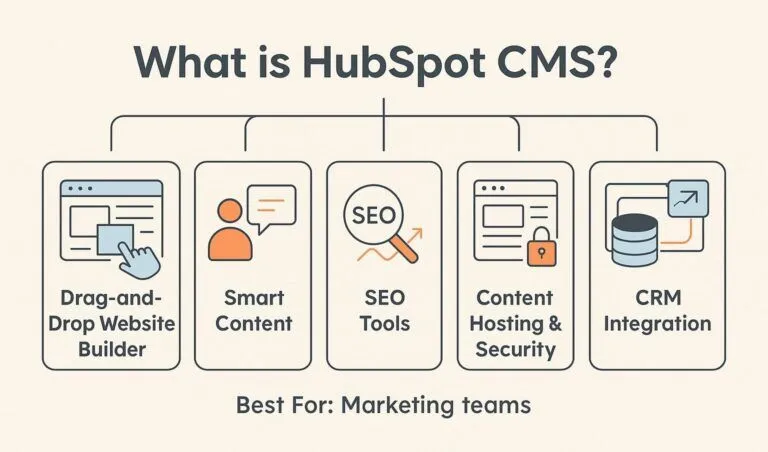
What is HubSpot CMS?
HubSpot CMS (Content Management System) focuses on website and content management. Unlike standalone CMS platforms such as WordPress or Drupal, HubSpot CMS is built around CRM-driven personalization.
Key Features of HubSpot CMS
Drag-and-Drop Website Builder – Create landing pages and blogs without coding.
Smart Content – Show personalized messages based on CRM data.
SEO Tools – On-page SEO recommendations and content strategy planning.
Content Hosting & Security – Built-in hosting, SSL, and monitoring.
CRM Integration – Connects web activity to the CRM for better insights.
Best For: Marketing teams that want content personalization and easy integration with customer data.
HubSpot CRM vs HubSpot CMS: What’s the Difference?
Feature
HubSpot CRM
HubSpot CMS
Purpose
Manage customer data, pipeline, and sales
Manage website, landing pages, and content
Primary Users
Sales, service, and marketing teams
Marketing teams, content creators, developers
Data Handling
Tracks leads, deals, customer interactions
Uses CRM data for personalization
Integration
Connects with tools like Gmail, Outlook, Salesforce
Connects directly to HubSpot CRM
Outcome
Stronger customer relationships and revenue growth
Improved website performance and lead generation
Is HubSpot a CRM or CMS?
The short answer: HubSpot is both a CRM and a CMS.
If you’re focusing on customer data, sales pipelines, and communication, HubSpot CRM is the core.
If your goal is website building, content marketing, and personalization, HubSpot CMS is the tool.
Many companies use both together—the CRM drives the data, and the CMS uses that data for personalized experiences.
Why Businesses Use Both Together
1. Data-Driven Websites
HubSpot CMS pulls contact insights from the CRM to create dynamic web experiences. For example, a returning visitor may see different calls-to-action based on their lifecycle stage.
2. Improved Lead Management
When someone fills out a form on a HubSpot CMS landing page, the data flows instantly into HubSpot CRM—keeping your pipeline updated in real time.
3. Unified Marketing & Sales
With HubSpot, marketing efforts through the CMS (blogs, landing pages, SEO) feed directly into CRM-powered campaigns (emails, lead nurturing, deals).
HubSpot Alternatives for CRM and CMS
Some businesses compare HubSpot with other tools before deciding:
However, HubSpot’s advantage lies in the integration of both under one ecosystem, eliminating the silos that often occur when using separate tools.
How to Decide: CRM, CMS, or Both?
If you need sales and customer management: Start with HubSpot CRM (free to use at entry level).
If you need a website with personalization: Choose HubSpot CMS.
If you want both sales and marketing aligned: Invest in HubSpot CRM + CMS combined.
Conclusion
So, is HubSpot a CRM or CMS? It’s both. Businesses don’t need to choose between managing customer relationships or building a content-driven website. With HubSpot, you can achieve both goals in one ecosystem, ensuring your marketing and sales teams stay aligned.
If you’re considering implementing HubSpot CRM, CMS, or both, partnering with an experienced HubSpot Company like Mpire Solutions ensures the right strategy, smooth integration, and measurable growth.
FAQs
1. Is HubSpot a CRM or CMS?
HubSpot started as a CRM platform but has expanded into CMS and other hubs. The CRM is the core, while the CMS builds on top of it.
2. Do I need both HubSpot CRM and CMS?
Not always. If your business already uses another CRM but wants content personalization, CMS alone may work. For full benefits, both together provide the best alignment.
3. Can I use HubSpot CMS without HubSpot CRM?
Yes, but HubSpot CMS is most powerful when paired with the CRM since personalization relies on contact data.
4. How does HubSpot compare with WordPress as a CMS?
WordPress is more flexible with plugins, while HubSpot CMS integrates deeply with CRM data for personalization and marketing automation.
5. Is HubSpot CRM free?
Yes. HubSpot CRM offers a free version with essential features, making it a cost-effective entry point for small businesses.
I am a certified HubSpot Consultant, Full Stack Developer, and
Integration Specialist with over 15 years of experience successfully transforming
business-critical digital ecosystems. My expertise spans the entire software lifecycle,
ranging from high-performance web application development to managing large-scale
migrations, enterprise-grade CRM integrations, and secure compliance-driven solutions.





 HubSpot Consulting Needs