Book a 30-Minute Call With Our Certified Consultant
Connect directly with our accredited consultant to get clear answers on
your HubSpot underutilized features, integrations, reporting and automation.
In this Consultation, you can discuss:
HubSpot Consulting Needs
Custom Automation Plan
Forms are a vital bridge between your website visitors and your CRM. With a HubSpot API form, businesses gain the flexibility to capture, process and store lead data directly in HubSpot while maintaining control over their front-end experience. Mpire Solutions specializes in HubSpot API integration services designed to help businesses enhance lead generation, efficiently sync data and streamline their sales process.
What is a HubSpot API Form?
A HubSpot API form allows developers to submit data from custom forms on a website or application into HubSpot without relying on native HubSpot embed codes. It provides:
Flexibility: Use any custom design or front-end framework.
Accuracy: Send structured data directly into HubSpot properties.
Scalability of processes: Handle multiple submissions from different sources while keeping records centralized.
Why Use the HubSpot Form API?
Embed forms in non-HubSpot CMS platforms.
Maintain full design freedom without being limited by HubSpot embed styling.
Capture submissions from mobile apps, third-party tools or chatbots.
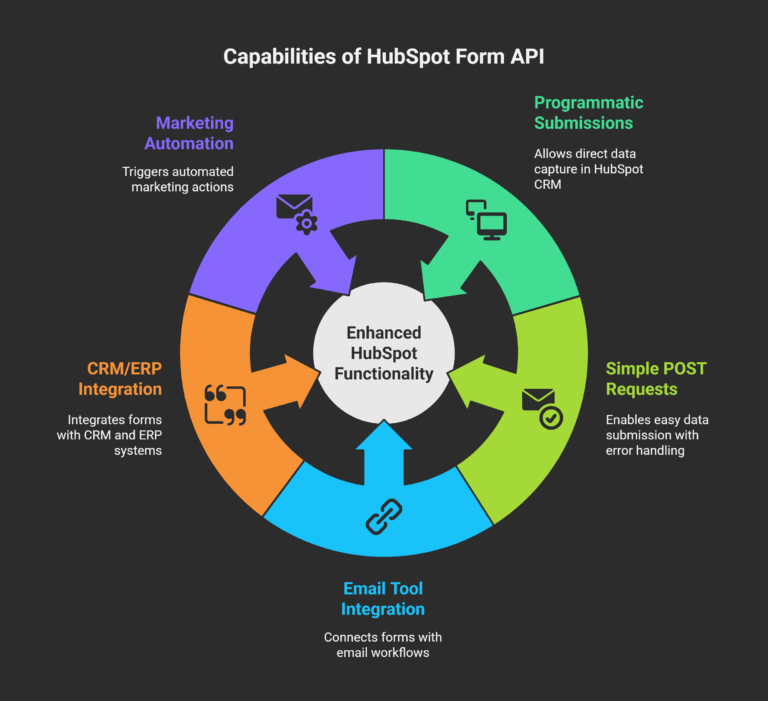
Key Capabilities of the HubSpot Form API
1. HubSpot API Form Submissions
The HubSpot API allows programmatic form submissions, making sure user data is captured directly in the HubSpot CRM. Submissions can include custom fields, hidden inputs and tracking tokens.
2. HubSpot API Form Submit
This functionality allows developers to send form data using simple POST requests. It includes error handling for invalid or incomplete fields.
3. HubSpot API Form Integration
Integrations can connect forms with:
Email tools for nurturing workflows.
CRMs and ERPs for lead management.
Marketing automation for triggers like sending thank-you emails.
How to Submit Data to a HubSpot API Form
Step 1: Create a HubSpot Form
Inside HubSpot, navigate to Marketing > Lead Capture > Forms and create a form to generate a GUID.
HubSpot responds with success or error messages that confirm if the submission was captured.
Benefits of Using HubSpot API Forms
Improved Data Control
Control every element of how form data is captured, structured and stored.
Consistency Across Platforms
Whether the form is hosted on WordPress, React or a mobile app, submissions remain consistent.
Deeper Integrations
Combine with external systems (like payment gateways or booking apps) for richer automation.
Common Use Cases
Custom Websites: Submit data from React, Vue or Angular forms into HubSpot.
Mobile Apps: Collect leads without redirecting to a web form.
Chatbots: Pass chatbot conversations into HubSpot CRM for follow-up.
Third-Party Apps: Capture lead data from event tools, surveys or calculators.
Best Practices for HubSpot API Form Integration
Map properties correctly: Align your form fields with HubSpot property names.
Use hidden fields: Track campaign source, UTM parameters or referrers.
Enable GDPR compliance: Always include consent checkboxes where required.
Test thoroughly: Use HubSpot form submission debug tools before going live.
Automate follow-ups: Link submissions with workflows to trigger instant responses.
Advanced Scenarios
HubSpot API Form with JavaScript
Developers can directly submit forms using fetch or Axios in the browser, making integration smooth for single-page apps.
HubSpot API Form with Python
For backend integrations, Python scripts can process user input and send to HubSpot endpoint.
HubSpot API Form Submissions with CRM Sync
Automatically push form data to other CRMs like Salesforce or Microsoft Dynamics using middleware or HubSpot workflows.
Why Choose Mpire Solutions for HubSpot API Form Integration?
With 15 years of consulting expertise, Mpire Solutions helps businesses:
Design and deploy custom API forms.
Connect HubSpot with ERP, CRM and marketing systems.
Ensure compliance with industry standards.
Maximize automation for better lead management.
Our HubSpot API Integration give you the flexibility to grow without compromising data quality or customer experience.
Conclusion
The HubSpot API form is a powerful tool for businesses that need flexibility, design freedom and advanced integrations. By leveraging API submissions, you ensure accurate data flow, personalized automation and streamlined operations. Partnering with Mpire Solutions gives you expert support in building custom form solutions that connect with your broader marketing and sales ecosystem.
FAQs
1. How do I get the HubSpot form GUID? You can find the form GUID in your HubSpot dashboard under Marketing > Lead Capture > Forms when editing or viewing form details.
2. Can I submit HubSpot API forms without using HubSpot embed code? Yes, the HubSpot Form API lets you build custom forms in any framework and push submissions directly into HubSpot.
3. Does the HubSpot API form support file uploads? Currently, file upload fields are limited. Workarounds include uploading files to external storage and passing URLs to HubSpot.
4. What authentication is needed for HubSpot API form submissions? Form submissions typically don’t require authentication but must include a valid portal ID and form GUID.
5. Can I track UTM parameters in HubSpot API form submissions? Yes. Add hidden fields to capture UTM parameters and pass them through your API request.
I am a certified HubSpot Consultant, Full Stack Developer, and
Integration Specialist with over 15 years of experience successfully transforming
business-critical digital ecosystems. My expertise spans the entire software lifecycle,
ranging from high-performance web application development to managing large-scale
migrations, enterprise-grade CRM integrations, and secure compliance-driven solutions.





 HubSpot Consulting Needs