Book a 30-Minute Call With Our Certified Consultant
Connect directly with our accredited consultant to get clear answers on
your HubSpot underutilized features, integrations, reporting and automation.
In this Consultation, you can discuss:
HubSpot Consulting Needs
Custom Automation Plan
As an experienced HubSpot consultant with over 15 years of CRM implementation expertise, I’ve seen sales teams transform their results once they fully understand how to use HubSpot Sales. This guide will show you exactly how to use HubSpot Sales, including how to use HubSpot Sales Hub, how to use HubSpot Sales in Outlook and how to use HubSpot CRM for sales with practical steps, examples and common mistakes to avoid.
If your team wants to enhance visibility and performance, consider a HubSpot Sales Hub Audit on Mpire Solutions. It helps identify gaps, improve data hygiene and optimise your workflow for better conversions.
Understanding the Foundation: HubSpot CRM for Sales
What HubSpot CRM Offers Sales Teams
HubSpot CRM provides a centralised space to manage contacts, companies, deals and activities. It lets sales teams track every interaction, assign leads, and manage deals efficiently.
Example: A rep named Sara receives a new lead from the website. She logs the call, sets a task for a follow-up and adds deal notes. Her manager can instantly see progress without needing constant check-ins.
Setting Up Your CRM for Sales Use
To make the most of HubSpot CRM:
Define your sales pipeline stages (e.g., Prospect → Qualified → Demo Scheduled → Proposal Sent → Closed Won/Lost).
Capture essential deal data like close date, amount, and deal owner.
Keep contact and company records updated regularly.
Assign new leads automatically to avoid delays.
Real-life scenario: A manufacturing company struggled with unassigned leads that stalled for weeks. After implementing automatic lead assignment and daily task reminders, they reduced lead response time by 40% and increased closure rates within three months.
How to Use HubSpot Sales Hub
Build and Monitor Your Pipeline
HubSpot Sales Hub helps you track deals through each stage. Customise pipeline stages, automate updates when deals move, and identify bottlenecks through analytics.
Example: If you notice that deals stay in “Proposal Sent” for over 14 days, that’s a sign of weak follow-up. You can use the Sales Hub dashboard to address these issues quickly.
Engage Leads with Sequences, Calls, and Meetings
Sales Hub provides tools for efficient engagement:
Sequences: Automate follow-ups with timed emails and task reminders.
Calls: Log and record calls directly from the CRM to maintain a history of interactions.
Meetings: Let prospects schedule directly from your HubSpot calendar link, automatically logging each meeting.
Real-life scenario: A SaaS company’s reps were forgetting to follow up after demos. By automating follow-up sequences, they increased their conversion rate by 18% in just one quarter.
Use Email Templates and Document Tracking
Save time and maintain consistency with templates for prospect outreach. Use document tracking to know when a client opens your proposal so you can follow up at the right time.
Reports and Analytics
The reporting dashboard in Sales Hub helps you answer vital questions such as:
How many deals are in each pipeline stage?
Which rep has the highest close rate?
What is the average deal size and cycle time?
With these insights, you can coach your team, adjust targets, and improve forecasting accuracy.
How to Use HubSpot Sales in Outlook
Install the Outlook Add-In
HubSpot’s Outlook integration allows you to:
Log emails to CRM records automatically.
Use HubSpot templates directly within Outlook.
Track opens and clicks to see which messages gain attention.
Sync Tasks and Meetings from Outlook to HubSpot
Meetings scheduled in Outlook can automatically appear in HubSpot timelines, saving manual entry and ensuring accurate data.
Real-life scenario: A financial services team using Outlook for all communication had poor CRM adoption. After enabling the HubSpot add-in, adoption jumped from 40% to 85% since reps could log everything from their inbox.
Best Practices
Always log prospect emails to CRM.
Filter out irrelevant internal communication from auto-logging.
Personalise templates for higher engagement.
Train your team to track email performance metrics like opens and clicks.
Putting It All Together: A Complete HubSpot Sales Workflow
Example Workflow
Lead Capture: A contact form fills automatically creates a new record in HubSpot CRM.
Qualification: A rep gets a task notification via Sales Hub and contacts the lead.
Meeting Scheduled: The Outlook meeting link syncs with HubSpot.
Demo Conducted: Notes and recordings are logged.
Proposal Sent: Document tracking shows when the prospect opens it.
Follow-Up Sequence: Automated emails and tasks trigger on schedule.
Deal Closed: The rep marks it “Closed Won,” and dashboards update in real time.
Handoff: The client is transitioned to onboarding or service teams.
Common Pitfalls and Fixes
Orphaned leads: Use automatic assignment rules.
Missed follow-ups: Use sequences and tasks.
Data gaps: Make critical fields mandatory.
Pipeline stagnation: Use dashboards to track “stale” deals.
Low email logging: Track compliance metrics and encourage Outlook integration.
Real-World Problems and Solutions
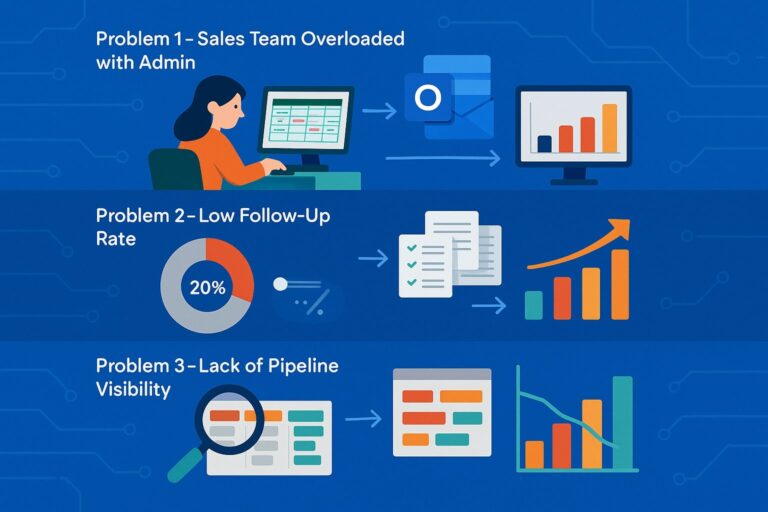
Problem 1 – Sales Team Overloaded with Admin
Scenario: A B2B services team spent hours updating spreadsheets manually. Solution: Automate task creation when deals move stages and integrate Outlook for automatic logging. Result: reps gained back 35% of selling time within six weeks.
Problem 2 – Low Follow-Up Rate
Scenario: Only 20% of new leads received timely follow-ups. Solution: Create sequences for automatic follow-up tasks. The company increased follow-ups by 68% and meetings by 40%.
Problem 3 – Lack of Pipeline Visibility
Scenario: Managers had no insight into deal progress or bottlenecks. Solution: Use HubSpot Sales Hub dashboards to visualise deals by stage and age. Average sales cycle reduced by 22% in three months.
Tips for Long-Term Success
Encourage daily CRM usage to keep data fresh.
Clean contact and company data weekly.
Review dashboards regularly for accurate forecasting.
Train your team on Outlook integration to ensure full adoption.
Conduct a HubSpot Sales Hub every quarter with Mpire Solutions to find gaps and make data-driven improvements.
Personalise your outreach using CRM insights for a better buyer experience.
Learning how to use HubSpot Sales is more than just understanding software; it’s about building a sales process that your team follows daily. When used correctly, HubSpot Sales Hub, Outlook integration, and CRM tools can help you convert faster, forecast better, and manage your pipeline with confidence.
For teams ready to scale performance, a HubSpot Sales Hub by Mpire Solutions helps identify growth barriers and streamline operations.
FAQs
Begin by defining your pipeline stages, importing contacts, assigning owners, and connecting your Outlook or Gmail account. Use HubSpot’s built-in automation to handle repetitive tasks.
HubSpot helps manage leads, track deals, automate follow-ups, and analyze sales performance through its Sales Hub tools.
HubSpot is a CRM platform that helps businesses manage marketing, sales, and customer service all in one place.
You can use HubSpot to attract leads, close more deals, and automate sales processes that boost revenue.
Yes, HubSpot offers a free CRM with core sales tools, though advanced features require a paid plan.
I am a certified HubSpot Consultant, Full Stack Developer, and
Integration Specialist with over 15 years of experience successfully transforming
business-critical digital ecosystems. My expertise spans the entire software lifecycle,
ranging from high-performance web application development to managing large-scale
migrations, enterprise-grade CRM integrations, and secure compliance-driven solutions.





 HubSpot Consulting Needs
 HubSpot Consulting Needs