Book a 30-Minute Call With Our Certified Consultant
Connect directly with our accredited consultant to get clear answers on
your HubSpot underutilized features, integrations, reporting and automation.
In this Consultation, you can discuss:
HubSpot Consulting Needs
Custom Automation Plan
In 2026, building AI-powered automation workflows has become more accessible than ever. If you’re exploring automation and looking to integrate chat capabilities into your workflows, this guide will walk you through how to build a n8n chatbot from scratch. Whether you’re aiming to build it using Python, for free or through the native n8n visual builder, this article outlines every step clearly. And if you’re considering workflow automation solutions, our n8n chatbot services can help bring your ideas to life.
Why Choose n8n to Build a Chatbot?
n8n is an open-source workflow automation tool that supports over 400 integrations. It’s ideal for both technical and non-technical users who want to connect apps, services and databases using a simple drag-and-drop interface or extend it using code. n8n sets itself apart from proprietary chatbot platforms by offering complete control, full data ownership and extensive customization options.
Prerequisites Before You Start
Before we dive into how to build a n8n chatbot from scratch, make sure you have the following:
A running instance of n8n (cloud or self-hosted)
Access to a chat interface (Telegram, WhatsApp via Twilio, Slack or a custom frontend)
Optional: Basic Python knowledge if coding specific functions
A webhook URL or API integration knowledge
Step 1: Define the Chatbot’s Purpose
Every chatbot begins with a use case. Decide what your chatbot should do:
Provide automated support
Gather user feedback
Schedule appointments
Fetch CRM or database data
Once your purpose is clear, list the triggers and responses you’ll need to automate.
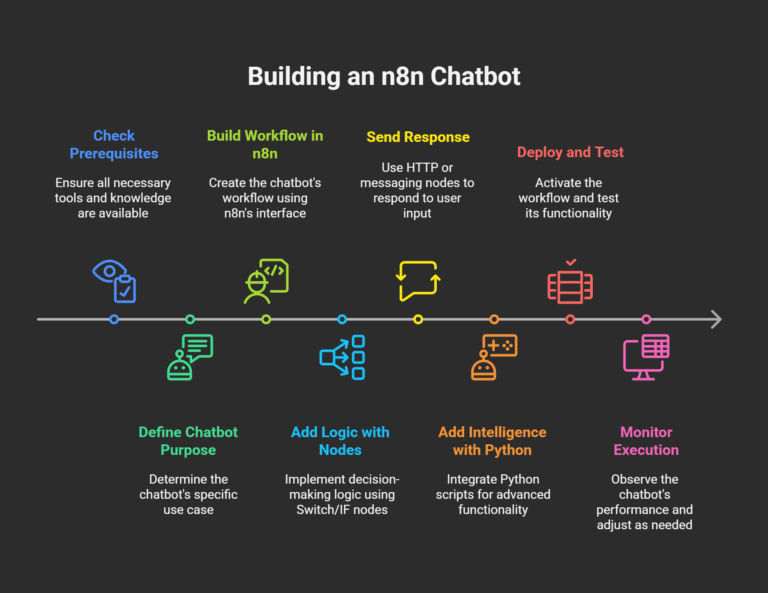
Step 2: Build a Workflow in n8n
Follow these steps to create a chatbot from the ground up using n8n’s visual interface:
Start with a Webhook Trigger
In n8n, create a new workflow.
Add a Webhook node to listen for incoming messages.
Add Logic with Switch/IF Nodes
Depending on user input, route the flow using Switch or IF nodes.
For instance, when a user types ‘hello,’ the chatbot can respond with a greeting message.
Send Response with HTTP or Messaging Node
Use HTTP Request to connect back to your chat platform.
Or, use built-in integrations like Telegram or Slack to respond directly.
Step 3: Add Intelligence Using Python (Optional)
If you’re exploring how to build a n8n chatbot from scratch using Python, here’s what to do:
Add the “Code” Node
This node allows you to write custom JavaScript but you can call Python APIs hosted elsewhere.
Run Python Scripts Externally
Deploy your Python script on a Flask or FastAPI server.
Use n8n’s HTTP Request node to send data to your Python backend and receive a response.
This approach allows you to leverage AI models like OpenAI’s GPT, sentiment analysis or any machine learning logic you’ve trained.
Step 4: Deploy and Test the Chatbot
Activate the Workflow
Once satisfied with your setup, activate the workflow.
Use your webhook or chat interface to send test messages and ensure the workflow functions correctly.
Monitor Execution
Use n8n’s execution logs to monitor errors and adjust responses or flows as needed.
How to Build a n8n Chatbot from Scratch for Free
If your goal is how to build a n8n chatbot from scratch for free, use these free tools and hosting options:
Self-host n8n on Heroku or a VPS (Docker makes this easy)
Use Telegram as your frontend—it’s free to use and has a bot API
Use free-tier APIs (e.g., OpenAI’s free trial or Hugging Face for NLP)
Leverage platforms like GitHub Actions or Vercel to run simple Python functions efficiently.
Bonus: Advanced Tips for Your n8n Chat bot
Stateful Conversations: Store context in n8n using Set and Function nodes or external databases like Firebase or Supabase.
Error Handling: Add Error Trigger Nodes to catch and log failures.
Personalization: Use user data from CRM or Google Sheets for tailored responses.
Use Case Example
Let’s say you want a chatbot that provides weather info:
User sends “Weather in London”
Webhook receives message
IF node parses ‘Weather’ keyword
HTTP node hits weather API
Response is sent back via Telegram
This can be done in under 10 minutes with n8n’s visual builder.
Conclusion
Learning how to build a n8n chat bot from scratch opens up endless automation possibilities for your business. Whether you’re using visual tools in n8n, incorporating Python for added intelligence or leveraging free tools to build your chatbot with no budget, the flexibility of n8n makes it all possible.
Want expert help or a custom solution? Mpire Solutions focuses on streamlining workflows and developing chatbots designed to support your business objectives. Let’s talk.
FAQs
1. Can I build a chatbot with n8n without any coding? Yes, n8n’s visual interface allows non-developers to create logic using drag-and-drop nodes.
2. Is it possible to use ChatGPT in n8n? Yes, by using the HTTP Request node, you can connect to OpenAI’s API and integrate ChatGPT.
3. What platforms can my chatbot support? Telegram, Slack, Discord, WhatsApp (via Twilio) and even custom web UIs through webhooks.
4. How do I store chatbot conversation history? Use Google Sheets, PostgreSQL or Airtable integrations in n8n to log conversations.
5. Is n8n chat bot free to deploy? Yes, if you self-host using Docker or services like Railway/Render and use open/free APIs.
I am a certified HubSpot Consultant, Full Stack Developer, and
Integration Specialist with over 15 years of experience successfully transforming
business-critical digital ecosystems. My expertise spans the entire software lifecycle,
ranging from high-performance web application development to managing large-scale
migrations, enterprise-grade CRM integrations, and secure compliance-driven solutions.





 HubSpot Consulting Needs
 HubSpot Consulting Needs