Book a 30-Minute Call With Our Certified Consultant
Connect directly with our accredited consultant to get clear answers on
your HubSpot underutilized features, integrations, reporting and automation.
In this Consultation, you can discuss:
HubSpot Consulting Needs
Custom Automation Plan
What is n8n workflow automation tool? It is an extendable platform designed to automate repetitive business tasks by connecting applications, APIs and internal systems without requiring advanced coding skills. With n8n, companies build workflows using visual logic, reducing time spent on manual tasks such as data entry, CRM updates and system-to-system communication. Many businesses start exploring n8n integrations for simple automations like syncing leads or routing notifications and then expand into advanced workflows that connect HubSpot, ERP tools and third-party apps to scale operations efficiently.
Is n8n really an automation engine that replaces manual work?
Yes, because n8n automates repetitive tasks with workflows, reducing human intervention and saving time across multiple business functions.
Why Businesses Are Asking About n8n Right Now
Automation has shifted from an optional improvement to a necessary competitive advantage. Companies now face messy data pipelines, scattered SaaS subscriptions and overworked teams. Sales reps enter the same information twice between CRM and ERP. Support teams manually forward tickets. Finance reconciles spreadsheets late at night.
That inefficiency costs money.
n8n enters this ecosystem as an automation platform designed to connect tools like HubSpot, Slack, Stripe, Notion, databases and AI services eliminating the burden of manual handoffs between systems and departments.
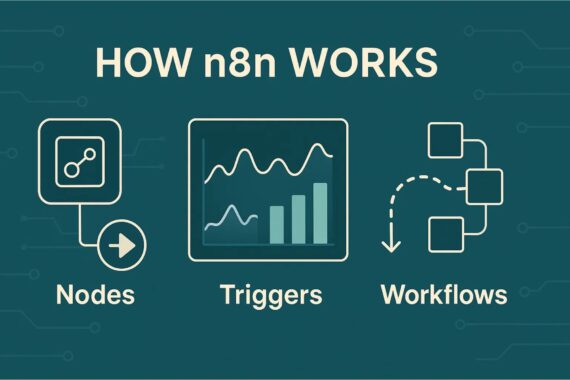
How n8n Works
n8n functions through a logical combination of nodes, triggers and workflows. Users design a chain of automated actions visually, similar to drawing a flowchart. Instead of coding the logic, they set conditions and link data sources, allowing n8n to orchestrate the sequence behind the scenes.
Nodes
Each node represents a function, system or action such as sending a message, updating HubSpot or processing a webhook.
Triggers
These events start workflows based on system updates, incoming API requests or schedule-based conditions.
Workflows
These define the full journey from trigger to outcome, combining steps into an automated process without human intervention.
Real Business Scenarios Where n8n Changes Everything
Scenario 1: The Founder Facing Integration Chaos
Owais runs a SaaS platform for B2B onboarding. Each new enterprise client demands custom integrations with CRMs or billing tools. Engineering keeps losing weeks building connectors instead of improving the product. n8n gives him reusable workflow templates, allowing the same logic to service multiple clients without custom code.
Scenario 2: The Marketing Team Losing Leads
Ayesha manually moves Facebook leads into HubSpot every morning. Sometimes she forgets. Sometimes the spreadsheet breaks. n8n automatically syncs the data, ensuring no lead slips away due to human error.
Scenario 3: Finance Spending Weekends on Reconciliation
A retail company exports transaction logs from Stripe and matches them with ERP records. It takes hours. n8n reads payments, maps entries and emails invoices without human involvement.
Each scenario proves one point: automation is not optional anymore.
Benefits of the n8n Workflow Automation Tool
Cuts operational time spent on repetitive tasks
Reduces dependency on developers for basic integrations
Works with hundreds of applications and APIs
Allows self-hosting for data-sensitive organizations
Bridges CRM, ERP and marketing tools without custom engineering
Who Should Use n8n?
The n8n workflow automation tool suits teams that:
Need to connect multiple SaaS tools
Rely heavily on CRM and marketing automation
Want logic-driven workflows without code
Struggle with repeated tasks and data fragmentation
Need HubSpot automation beyond default limits
Why n8n Stands Out
Most automation tools offer pre-built features with limited control. n8n allows branching logic, API-level customization and data transformation giving teams full autonomy to dictate how information flows across systems.
It doesn’t just automate tasks it engineers operational efficiency.
Connecting chat platforms for automated notifications
Integrating AI-powered checks into business processes
How n8n Fits a HubSpot-Driven Stack
HubSpot is a CRM powerhouse but it does not communicate natively with every organizational tool. n8n bridges that communication gap. For example:
A deal moving to “Closed Won” triggers invoice generation
Customer onboarding updates flow directly into ERP
Marketing pulls data instantly into analytics dashboards
The result is a connected HubSpot environment with fewer operational silos.
Will n8n Replace Developers?
No. It removes repetitive engineering work, enabling developers to focus on innovation, not maintenance. Businesses gain agility without increasing payroll costs.
Conclusion: What is n8n Workflow Automation Tool
The question is no longer whether automation is needed. It’s how quickly teams can adopt it.
The n8n workflow automation tool makes automation accessible, predictable and affordable for companies wanting to reduce manual tasks and improve data reliability. It empowers business teams to create dynamic workflows without writing complex code, making it one of the most strategic automation platforms available today.
If your organization operates multiple systems, performs repetitive work or struggles to maintain data accuracy, n8n may be the automation engine your processes have been waiting for.
The question is no longer whether automation is needed. It’s how quickly teams can adopt it.
The n8n workflow automation tool makes automation accessible, predictable and affordable for companies wanting to reduce manual tasks and improve data reliability. It empowers business teams to create dynamic workflows without writing complex code, making it one of the most strategic automation platforms available today.
If your organization operates multiple systems, performs repetitive work or struggles to maintain data accuracy, n8n may be the automation engine your processes have been waiting for.
FAQs
n8n workflow automation is a visual system that connects apps, APIs and data to perform tasks automatically, reducing manual work and improving process efficiency.
A workflow automation tool is software that replaces repetitive, manual steps with rule-based actions, allowing tasks to run automatically across different systems.
n8n uses nodes and triggers to link applications, define actions and move data between them. You build workflows visually and n8n executes them based on set conditions or events.
n8n AI enables automated decisions, text generation and intelligent data processing by integrating AI models into workflows, making automations smarter and more context-aware.
It connects with ERP platforms, syncing financial and operational data using APIs.
I am a certified HubSpot Consultant, Full Stack Developer, and
Integration Specialist with over 15 years of experience successfully transforming
business-critical digital ecosystems. My expertise spans the entire software lifecycle,
ranging from high-performance web application development to managing large-scale
migrations, enterprise-grade CRM integrations, and secure compliance-driven solutions.





 HubSpot Consulting Needs
 HubSpot Consulting Needs