Book a 30-Minute Call With Our Certified Consultant
Connect directly with our accredited consultant to get clear answers on
your HubSpot underutilized features, integrations, reporting and automation.
In this Consultation, you can discuss:
HubSpot Consulting Needs
Custom Automation Plan
What is n8n Email Marketing Automation
In a world where every customer expects personalized communication, automation tools are transforming how marketing teams operate. One of the most flexible and powerful platforms leading this change is n8n.
So, what is n8n email marketing automation? It’s the process of automating email workflows using n8n’s visual, node-based interface allowing teams to connect tools, personalize outreach and eliminate repetitive manual work.
At Mpire Solutions, our experience with n8n integrations helps businesses bridge platforms like HubSpot, Gmail, Airtable, and Slack for smarter, more efficient marketing systems.
Understanding n8n Email Marketing Automation
n8n (short for “nodemation”) is an open-source workflow automation tool that allows marketers to create complex, logic-driven email workflows without writing code. It connects hundreds of applications from CRM systems and databases to analytics and social platforms.
Email marketing automation with n8n goes beyond simple auto-responders. It lets you:
Trigger emails based on user behavior (form submissions, purchases, or app activity).
Personalize messages using CRM data.
Automate A/B testing, segmentation, and performance tracking.
Integrate multiple tools for unified reporting.
Unlike traditional marketing automation tools that limit users to predefined templates, n8n gives complete creative and technical control over each workflow.
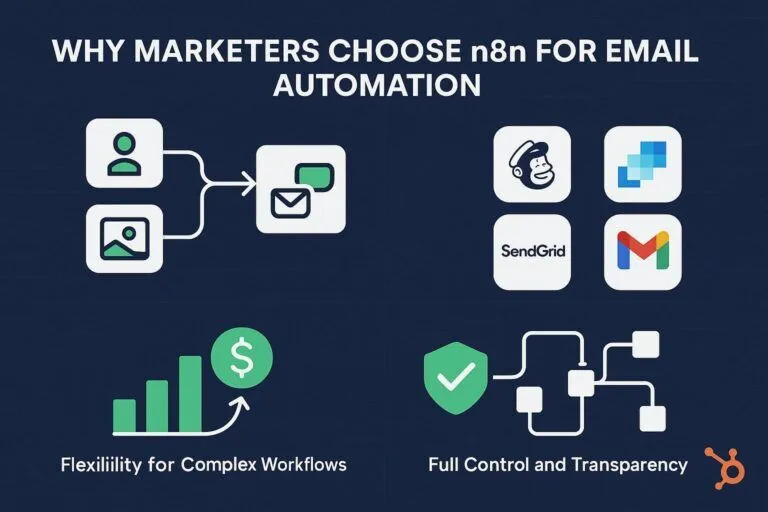
Why Marketers Choose n8n for Email Automation
1. Flexibility for Complex Workflows
n8n lets you create multi-step workflows that branch based on user actions. For instance, if a user clicks on a product link but doesn’t buy, n8n can automatically send a reminder email with similar items.
2. Integration Across the Marketing Stack
With hundreds of prebuilt nodes, n8n integrates with HubSpot, Mailchimp, SendGrid and Gmail. It connects marketing, sales and customer success data helping teams act on insights in real time.
3. Cost Efficiency for Startups and Enterprises
Unlike expensive proprietary tools, n8n offers self-hosting and free usage tiers ideal for startups experimenting with automation and enterprises optimizing costs.
4. Full Control and Transparency
Because it’s open source, n8n allows full customization of workflows and data handling. Marketing teams know exactly how information moves between systems, ensuring compliance and security.
Real-World Scenarios: How Businesses Use n8n Email Automation
Scenario 1: Re-Engaging Cold Leads
Problem: Maria, a marketing specialist at a B2B SaaS firm, struggled with thousands of inactive leads. Manually segmenting and emailing them consumed days.
Solution: Using n8n, she connected HubSpot and Gmail. The workflow automatically identified leads who hadn’t engaged in 90 days, sent re-engagement emails, and updated CRM tags based on responses.
Result: Maria revived over 20% of cold leads and reduced manual work by 90%.
Scenario 2: Personalized Onboarding Campaigns
Problem: An e-commerce startup’s onboarding emails were generic and didn’t reflect customer interests, leading to high drop-off rates.
Solution: With n8n, their team integrated Shopify, HubSpot, and SendGrid. The system triggered personalized welcome emails based on product categories purchased.
Result: Click-through rates increased by 40%, and customer retention improved significantly.
Scenario 3: Event Follow-Ups Without Manual Tracking
Problem: David, an event coordinator, often missed follow-ups after webinars because attendee data was spread across forms and sheets.
Solution: n8n automated the entire post-event process capturing attendee details from Google Sheets, sending thank-you emails, and adding contacts to HubSpot for nurturing.
Result: David saved hours weekly and maintained consistent engagement with prospects.
Key Components of an n8n Email Marketing Workflow
1. Triggers
Define what starts the automation, such as a new lead in HubSpot, a form submission, or a scheduled event.
2. Logic and Filters
Apply conditional paths (If/Else nodes) to segment audiences or personalize messages.
Example: If a lead opens three emails but hasn’t booked a demo, trigger a “Book a Call” message.
3. Email Nodes
Connect to Gmail, Outlook, or SMTP to send dynamic, personalized messages using contact data.
4. Integrations
Incorporate CRM, analytics, and social media tools for cross-channel automation. This could include HubSpot for contact management, Airtable for segmentation, and Slack for team notifications.
5. Reporting
Add Google Sheets or HubSpot properties to track open rates, click rates, and conversions—all from one central system.
Benefits of Using n8n for Email Marketing Automation
Time Efficiency: Reduces repetitive manual tasks such as list segmentation, follow-ups and data entry.
Personalization: Sends contextually relevant messages using behavioral triggers.
Improved Conversion Rates: Consistent communication drives engagement and brand recall.
Integration Power: Combines marketing, sales and analytics tools for unified insights.
Ownership of Data: Full visibility and control compared to closed SaaS platforms.
How to Get Started with n8n Email Marketing Automation
Install n8n: Choose between self-hosted or cloud versions.
Connect Tools: Use prebuilt integrations to link CRM, ESP and analytics apps.
Define Goals: Outline your email automation objectives lead nurturing, retention or engagement.
Design Workflows: Use drag-and-drop nodes to build workflows without coding.
Test and Optimize: Monitor performance, tweak triggers and enhance deliverability over time.
For expert setup and advanced use cases, businesses often partner with automation specialists like Mpire Solutions, who configure n8n integration with HubSpot and enterprise systems for scalable success.
Common Mistakes to Avoid
Over-Automation: Sending too many triggered emails can overwhelm users.
Ignoring Data Hygiene: Ensure clean CRM data to prevent inaccurate triggers.
Lack of Testing: Always run test workflows before deploying to live audiences.
Not Aligning with Strategy: Automation should align with the overall customer journey, not replace it.
The Future of n8n Email Marketing Automation
As AI and personalization tools advance, n8n’s open architecture makes it future-proof for marketing innovation. By integrating AI APIs like OpenAI or HubSpot predictive insights, teams can automatically craft subject lines, segment audiences, and forecast engagement metrics all inside one workflow.
For businesses serious about digital transformation, combining n8n with HubSpot creates a powerful ecosystem where marketing, sales and service align toward measurable growth.
So, what is n8n email marketing automation really about? It’s not just automating emails; it’s about automating relationships. By bridging data, tools, and creativity, n8n empowers marketers to communicate smarter, faster, and with greater impact.
Whether you’re a startup automating outreach or an enterprise optimizing engagement at scale, Mpire Solutions can help you design and implement n8n integration that transforms your marketing operations.
FAQs
n8n is used to automate workflows sending personalized emails, syncing CRM data, and managing campaign analytics without manual effort.
Yes. You can integrate HubSpot with n8n to automate lead nurturing, follow-ups, and contact segmentation directly within your marketing stack.
Absolutely. n8n’s open-source model allows small businesses to automate complex email workflows without expensive tools.
n8n offers greater flexibility and cross-platform integration, allowing you to combine multiple systems rather than staying within one ecosystem.
Yes. You can connect SMTP or APIs like SendGrid to send automated transactional emails such as receipts, confirmations, or password resets.
I am a certified HubSpot Consultant, Full Stack Developer, and
Integration Specialist with over 15 years of experience successfully transforming
business-critical digital ecosystems. My expertise spans the entire software lifecycle,
ranging from high-performance web application development to managing large-scale
migrations, enterprise-grade CRM integrations, and secure compliance-driven solutions.





 HubSpot Consulting Needs