Book a 30-Minute Call With Our Certified Consultant
Connect directly with our accredited consultant to get clear answers on
your HubSpot underutilized features, integrations, reporting and automation.
In this Consultation, you can discuss:
HubSpot Consulting Needs
Custom Automation Plan
If you’re exploring workflow automation, low-code tools, or ways to integrate scattered systems without heavy engineering, you’ve likely come across n8n. It’s becoming a preferred platform for creators, SaaS teams, developers, and operations managers who want to automate daily work without losing flexibility or control. Many organizations considering n8n integrations also work with platforms like HubSpot, Make, and Zapier and at Mpire Solutions, we help businesses build these experiences through automation consulting and implementation.
This guide explains what is n8n and how to use it, along with real examples, beginner steps and practical use cases.
Understanding What n8n Is
A Flexible Low-Code Automation Platform
When people ask what is n8n and how does it work, the simplest answer is: n8n is an open-source automation tool that lets you connect apps, trigger workflows, and process data using a visual editor.
It sits between entry-level no-code automation (e.g., Zapier) and full custom development. You get the flexibility of code when you need it, yet non-technical users can still build workflows through a drag-and-drop interface.
Key Capabilities
n8n strength comes from three areas:
Visual Workflow Builder
You build workflows using nodes each node represents an action, trigger, or transformation.
Native API Handling
Instead of being limited to predefined templates, n8n allows:
Custom API calls
Custom authentication
Multi-step logic
Math, aggregation, and formatting
This is especially helpful for businesses running custom CRM fields, complex operational logic, or multi-system integrations.
Self-host or Cloud
You can run n8n on your server for full control or use n8n Cloud. This makes it suitable for companies needing security compliance or custom workflows.
What Is n8n and How Does It Work?
Understanding how n8n works becomes easier when you break it into three parts.
1. Triggers Start the Workflow
A trigger could be:
New HubSpot contact
A Webhook event
A new email in Gmail
A Slack message
A Shopify order
A scheduled cron job
Triggers fire the workflow and pass data forward.
2. Nodes Process and Move Data
Nodes can:
Add or update records
Query APIs
Format text
Split or merge data
Send email or notifications
Filter or route steps based on conditions
Nodes are linked visually, making the automation readable even for non-technical users.
3. Execution Runs Step by Step
Once the workflow is active, n8n runs through each step sequentially and logs the results. You can inspect the inputs and outputs of any node to debug or refine the workflow.
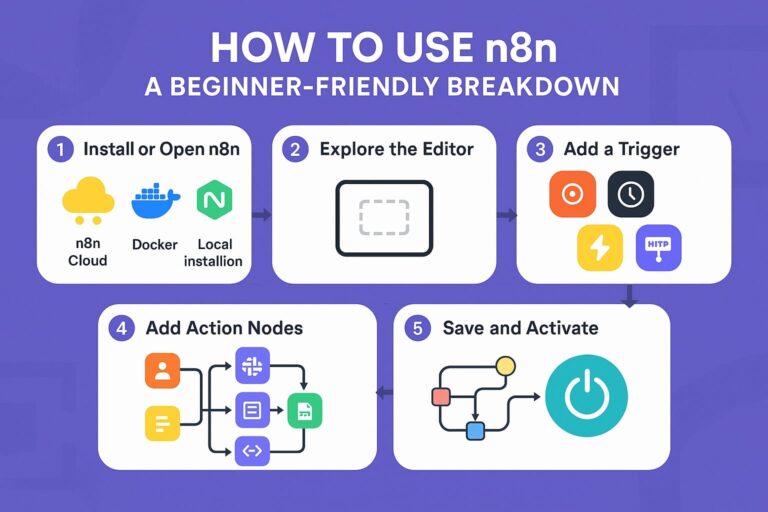
How to Use n8n: A Beginner-Friendly Breakdown
1. Install or Open n8n
You can use n8n in three ways:
n8n Cloud
Docker installation
Local installation (Node.js)
Most beginners start with cloud for ease.
2. Explore the Editor
The editor shows a blank canvas. This is where you drag nodes, connect them, and design workflows.
3. Add a Trigger
Common triggers include:
Webhook
Cron
App-specific triggers (HubSpot, Google Sheets, Notion, Slack, Airtable)
This defines when the automation should start.
4. Add Action Nodes
For example:
Create HubSpot contact
Send Slack message
Query Google Sheets
Make HTTP request
Format JSON
Push to database
You can mix and match as many nodes as needed.
5. Save and Activate
Once activated, n8n runs your workflow automatically based on the trigger conditions.
Real-Life Scenarios: Where n8n Solves Real Problems
Scenario 1: A Marketing Team Struggling with Manual Lead Processing
A SaaS team receives leads from multiple places Meta Ads, a WordPress form, and webinars. They manually upload CSVs into HubSpot every week.
n8n solution: Automatically collect all lead sources, clean the data, dedupe records, enrich with Clearbit, and push into HubSpot instantly.
Result: Lead response becomes faster, and sales touches happen on time.
Scenario 2: An E-commerce Brand Tracking Orders Across Shopify, WhatsApp, and Google Sheets
The operations team was copying order details between channels for fulfillment.
n8n solution: A workflow that syncs Shopify orders → sends WhatsApp messages → updates Google Sheets in real time.
Result: No manual entry, fewer errors, and faster deliveries.
Scenario 3: A Small Agency Managing Client Reporting
Manually pulling GA4, Meta Ads, and HubSpot data every Monday wasted hours.
n8n solution: A scheduled workflow that collects metrics from all tools and sends a compiled report to Slack and email.
Result: Consistent reporting and fewer missed updates.
Why n8n Is Gaining Popularity
Open Source + High Flexibility
Teams can customize logic far more than restricted no-code platforms.
Affordable
Instead of paying per automation, per task, or per record, n8n allows more flexibility with pricing and hosting.
Community and Transparency
Developers contribute nodes, troubleshoot issues, and extend n8n in ways closed platforms can’t match.
Beginner-Friendly Use Cases to Start Today
Automate Notifications
Send Slack or email alerts when:
A new lead enters a stage
A customer submits a form
A task is updated
A payment is received
Sync Data Between Tools
Examples:
HubSpot ←→ Google Sheets
Airtable ←→ Slack
Shopify ←→ CRM
Notion ←→ Email Marketing Tool
Build Mini-Apps
Many small teams use n8n to create internal tools for:
Lead scoring
Subscription alerts
Daily summaries
Document generation
Using n8n for HubSpot Automations
Many businesses integrate n8n with HubSpot to achieve:
Advanced workflows beyond HubSpot workflow limits
Multi-step API conditions
Custom scoring
Two-way CRM sync
Automated tasks, notes, and ticket updates
Deep integrations with ERP, payroll, or analytics
This is where specialized HubSpot + n8n consulting adds value, especially for companies scaling operations.
Pros and Cons of n8n (Realistic Overview)
Advantages
Visual workflows
Deep API customization
Strong community
Freedom to self-host
Flexible logic for complex automation
Limitations
Requires some learning curve
More technical than Zapier
Best suited for teams comfortable with data and APIs
Best Practices for Using n8n Effectively
Start Small
Begin with one workflow so you understand triggers, nodes, and execution.
Comment Each Node
Helpful for your future self or teammates.
Use Error Handling
Add branches to manage failures so workflows don’t break unexpectedly.
Keep Workflows Modular
Split large workflows into smaller, reusable components.
Understanding what is n8n and how to use it is becoming essential for companies trying to automate operations, reduce manual tasks, and improve efficiency without building everything from scratch. Its flexibility makes it ideal for teams connecting CRMs, marketing platforms, e-commerce stores, ERPs, and internal tools.
If your business is considering n8n or exploring advanced automations that connect HubSpot with other platforms, Mpire Solutions can help plan, build, and optimize workflows that match your operational goals.
FAQs
n8n is used for automating workflows, connecting applications, processing data, and creating multi-step logic without full coding. It helps teams reduce manual work and integrate systems.
n8n offers more flexibility and control, especially for API-based automation or custom workflows. Zapier is simpler for quick tasks, but n8n is preferred for advanced, multi-step automations.
Yes. The visual editor makes it accessible for non-developers. However, technical users can extend it using JavaScript, custom nodes, and advanced API logic.
Yes. n8n is open-source. You can self-host for free or choose n8n Cloud for managed hosting.
Yes. n8n includes native HubSpot nodes, and you can also perform custom HubSpot API calls for advanced CRM workflows.
I am a certified HubSpot Consultant, Full Stack Developer, and
Integration Specialist with over 15 years of experience successfully transforming
business-critical digital ecosystems. My expertise spans the entire software lifecycle,
ranging from high-performance web application development to managing large-scale
migrations, enterprise-grade CRM integrations, and secure compliance-driven solutions.





 HubSpot Consulting Needs
 HubSpot Consulting Needs