Book a 30-Minute Call With Our Certified Consultant
Connect directly with our accredited consultant to get clear answers on
your HubSpot underutilized features, integrations, reporting and automation.
In this Consultation, you can discuss:
HubSpot Consulting Needs
Custom Automation Plan
If you work in sales, support or customer success, you’ve likely typed the same responses dozens of times a day. That’s exactly where snippets come in. As a hubspot agency working with growing teams, we see snippets become one of the fastest ways to improve reply speed, accuracy and consistency inside HubSpot.
Snippets are short, reusable text blocks saved inside HubSpot that let teams insert common answers, pricing details or introductions in seconds without rewriting them every time.
What are snippets in HubSpot and why do teams use them?
Snippets in HubSpot are saved text shortcuts that help users insert frequently used responses into emails, chats and CRM notes to save time.
What Are Snippets in HubSpot?
Snippets in HubSpot are predefined pieces of text that users can quickly insert into one-to-one emails, live chat conversations and CRM records. Instead of copying and pasting from documents or typing the same message repeatedly, snippets allow instant reuse with a simple command.
From real-world use, sales reps rely on snippets to answer pricing questions, explain next steps or send meeting follow-ups. Support teams use them to reply to common issues without changing tone or missing key details.
How Snippets Work Inside HubSpot
Snippets live inside your HubSpot CRM and can be accessed anywhere HubSpot allows text input.
Here’s how they function in daily workflows:
You create a snippet once You can set a custom shortcut such as #pricing or #intro to quickly insert the snippet when needed. You type the shortcut in an email or chat HubSpot instantly inserts the saved text
This keeps replies consistent across the team and removes the guesswork for new hires.
Real-Life Example: Sales Team Losing Time on Repetitive Emails
One SaaS sales team we worked with had 6 reps sending nearly identical pricing explanations every day. Each response took 3–5 minutes to write. That added up to hours lost weekly.
After setting up pricing and qualification snippets in HubSpot, response time dropped to seconds and message quality improved because everyone used the same approved wording.
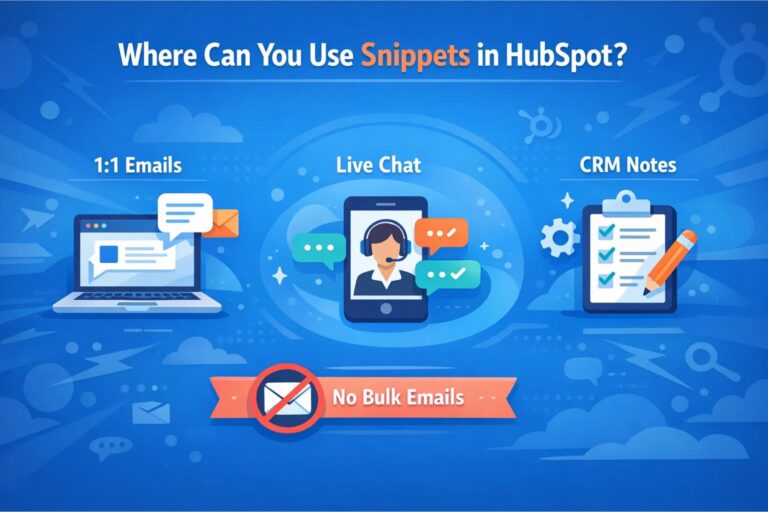
Where Can You Use Snippets in HubSpot?
Snippets are flexible and show up across multiple HubSpot tools:
One-to-One Emails
Perfect for sales outreach, follow-ups and customer replies.
Live Chat and Conversations
Support and sales agents can reply instantly without searching past messages.
CRM Notes and Tasks
Internal teams use snippets to log consistent updates or handoff notes.
Snippets are not used in bulk marketing emails. They are designed for personal, direct communication.
Snippets vs Templates in HubSpot
This is a common point of confusion.
Snippets are short and reusable Templates are full email drafts
If you frequently answer “What’s your pricing?” or “What happens after the demo?”, snippets are ideal. If you send full prospecting emails or onboarding emails, templates make more sense.
In practice, high-performing teams use both together.
How to Create Snippets in HubSpot
Creating snippets is simple and doesn’t require admin-level expertise.
Go to HubSpot settings Navigate to Library → Snippets Click “Create snippet” Add your text and assign a shortcut
Once saved, the snippet becomes instantly available across the CRM.
Common Use Cases for Snippets
Based on real client setups, these are the most effective snippet categories:
Understanding what are snippets in HubSpot goes beyond definitions. In real teams, snippets reduce wasted time, prevent errors and help sales and support reps focus on conversations that matter.
When implemented correctly, they become one of the simplest yet most effective tools inside HubSpot especially for growing teams aiming to improve speed and consistency without sacrificing quality.
FAQs
A snippet in HubSpot is a reusable text block that lets sales and support teams insert approved responses into emails, chats and CRM records with one shortcut.
The purpose of HubSpot snippets is to save time, maintain message consistency and ensure teams use accurate, pre-approved responses during daily customer communication.
A HubSpot snippet is a short reusable text insert, while a template is a full email layout used to create complete, repeatable emails.
An example of a HubSpot snippet is a saved meeting-link message or pricing explanation that can be quickly added to emails or live chats.
No, snippets are designed for one-to-one emails and conversations, not bulk marketing campaigns.
I am a certified HubSpot Consultant, Full Stack Developer, and
Integration Specialist with over 15 years of experience successfully transforming
business-critical digital ecosystems. My expertise spans the entire software lifecycle,
ranging from high-performance web application development to managing large-scale
migrations, enterprise-grade CRM integrations, and secure compliance-driven solutions.





 HubSpot Consulting Needs
 HubSpot Consulting Needs