Book a 30-Minute Call With Our Certified Consultant
Connect directly with our accredited consultant to get clear answers on
your HubSpot underutilized features, integrations, reporting and automation.
In this Consultation, you can discuss:
HubSpot Consulting Needs
Custom Automation Plan
HubSpot API Rate Limits: A Comprehensive Guide for Developers and Users
In today’s digital landscape, HubSpot has become one of the most popular platforms for managing customer relationships, marketing automation and sales pipelines. Many businesses rely on HubSpot to streamline their operations and enhance their customer interactions. As businesses grow, so does their need for powerful integrations to manage data more efficiently. This is where HubSpot API comes into play. However, understanding HubSpot API rate limits is essential for optimizing your usage and ensuring smooth performance. In this article, we’ll explore everything you need to know about HubSpot API rate limits, how to manage them effectively and how to ensure your integrations remain functional without running into issues.
For businesses seeking to integrate HubSpot into their systems, HubSpot API Integration Services can offer valuable solutions for streamlining processes. This guide will provide clarity on how to work with HubSpot’s API limits, ensuring that your API calls don’t disrupt operations and maximize the benefits of your HubSpot integration.
What Are HubSpot API Rate Limits?
HubSpot provides a powerful API that enables businesses to integrate their systems with HubSpot for better data management, automation and reporting. However, to ensure fair usage and avoid server overloads, HubSpot imposes certain rate limits on API calls.
In simple terms, HubSpot API rate limits refer to the maximum number of API requests that can be made within a specific time period. These limits help prevent system abuse, ensuring that HubSpot’s servers remain responsive for all users.
Types of HubSpot API Rate Limits
The HubSpot API features two primary types of rate limits:
Tiered Rate Limits: HubSpot offers different rate limits based on the subscription tier or API type. For instance, the API calls per day vary depending on whether you have a free HubSpot account, a Starter account or a higher-tier account.
API Key Rate Limits: HubSpot provides each account with an API key that governs the number of requests you can make. Typically, the rate limit is measured by the number of requests per day or minute.
Understanding HubSpot API Rate Limits
Knowing how to manage HubSpot API rate limits is essential for developers and businesses that rely on frequent API calls. Here’s a deeper look into how these limits are structured:
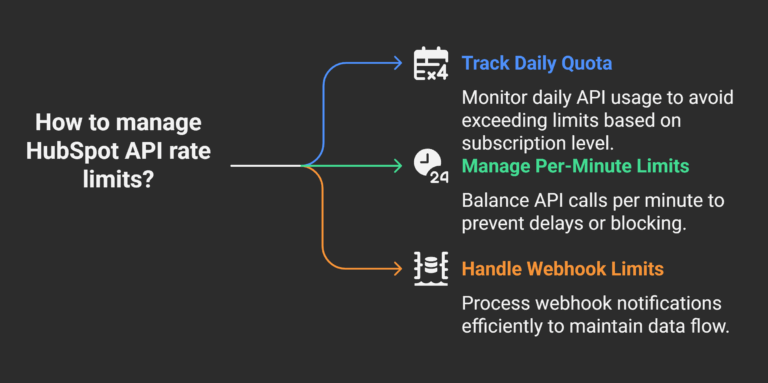
1. Daily Rate Limits
HubSpot API limits requests on a daily basis, so it’s important to track your daily quota usage. The number of requests you can make in a 24-hour period varies depending on your HubSpot subscription level.
For example, businesses using HubSpot’s free plan are generally restricted to fewer API calls than those on higher-tier plans. This daily rate limit includes all types of API requests, such as fetching data, sending emails or interacting with HubSpot CRM features.
2. Per-Minute Rate Limits
In addition to the daily limits, HubSpot also enforces per-minute rate limits for certain actions. This helps to balance the load on HubSpot’s servers and prevents users from overloading the system in a short period.
For example, you might be able to make a higher number of calls in one day but you’ll still be restricted in how many you can make each minute. Exceeding this limit within any given minute will result in your API requests being delayed or blocked until the next minute.
3. API Rate Limit for Webhooks
HubSpot also imposes rate limits on webhooks, which are automated messages sent to a URL when certain events occur. If your system processes numerous webhook notifications in a short amount of time, you could encounter rate-limiting issues. The good news is that HubSpot provides guidance on how to handle these limits without disrupting the flow of data between systems.
How to Check Your HubSpot API Usage
HubSpot provides developers and users with tools to monitor their API usage, making it easier to stay within rate limits. Here’s how to check your API usage:
1. HubSpot API Dashboard
HubSpot offers a dedicated API usage dashboard where you can view your current usage and track how many API requests you have left. This dashboard is especially useful for businesses with multiple integrations, as it provides an overview of all your API activity.
2. API Response Headers
When you make an API call, HubSpot includes usage information in the response headers. These headers will indicate the number of requests remaining within the current time window and help you assess if you’re nearing your rate limit.
The following headers are important to note:
X-RateLimit-Limit: The maximum number of API calls allowed in the current time window.
X-RateLimit-Remaining: The number of requests remaining before the rate limit is hit.
By checking these headers, you can adjust your application’s behavior to avoid hitting the rate limit.
Best Practices to Avoid Hitting HubSpot API Rate Limits
Managing HubSpot API rate limits is crucial for developers and businesses to ensure smooth, uninterrupted operations. Here are some best practices to help you avoid exceeding rate limits:
1. Optimize API Calls
Rather than making multiple individual requests, try to batch multiple operations into one request. HubSpot’s API allows certain bulk operations, such as batch processing for CRM objects (like contacts, deals and tickets), which can reduce the number of requests.
2. Implement Exponential Backoff
If you encounter a rate-limiting error, implement exponential backoff in your application. This means gradually increasing the delay between retries rather than attempting a flood of requests immediately after encountering an error. This approach helps reduce the strain on HubSpot’s servers and allows your integration to resume without issues.
3. Cache Data
To avoid making frequent API requests for the same data, consider implementing data caching in your application. By storing data locally and only making API calls when absolutely necessary, you can significantly reduce the load on the HubSpot API and prevent rate limit issues.
4. Use Webhooks Efficiently
Webhooks allow HubSpot to send data updates in real-time, which means you don’t need to constantly poll the API for changes. Use webhooks for event-driven integrations and avoid unnecessary API calls. However, be mindful of webhook rate limits and ensure that your server can handle the incoming traffic efficiently.
How to Handle Exceeding HubSpot API Rate Limits
Even with careful planning and optimization, there might be times when you hit the rate limit. When this happens, HubSpot will return a 429 Too Many Requests status code.
Here’s what to do if you exceed HubSpot API rate limits:
1. Pause and Wait: The first step is to pause API calls for a while and wait until the rate limit window resets. HubSpot’s API will specify when you can resume making calls.
2. Retry Logic: Implement retry logic with exponential backoff in your system to ensure that you can continue with your requests once the rate limit is reset.
3. Increase Limits: If you consistently hit rate limits due to business growth, you may consider upgrading to a higher-tier HubSpot subscription, which may offer higher API rate limits.
Conclusion
Understanding and managing HubSpot API rate limits is essential for anyone looking to integrate HubSpot into their business processes efficiently. By following best practices like optimizing API calls, implementing exponential backoff and leveraging webhooks, you can ensure that your integrations run smoothly without hitting roadblocks. If you’re looking to make the most out of your HubSpot integration, HubSpot Integration Services can provide expert solutions that cater to your specific needs.
By staying within API limits and monitoring usage closely, you can avoid disruptions and continue delivering high-value services to your clients.
FAQs
1. What happens when I exceed the HubSpot API rate limit?
Surpassing the rate limit triggers a 429 Too Many Requests error. This means your subsequent API requests will be blocked until the rate limit resets, which can range from a few minutes to 24 hours depending on the type of limit.
2. How can I check my HubSpot API usage?
You can monitor your API usage through the HubSpot API usage dashboard or by checking the API response headers for rate limit status. Both methods provide insights into your current usage.
3. How do I handle HubSpot webhook rate limits?
HubSpot enforces rate limits on webhooks as well. You should implement retry mechanisms and ensure your server can handle incoming webhook traffic. Efficiently handling webhook notifications can help avoid disruptions.
4. Can I request a higher API limit from HubSpot?
HubSpot does not offer a direct way to request a higher API limit but businesses on higher-tier plans often receive more API requests. If you frequently reach the rate limit, consider upgrading your HubSpot plan for better performance.
5. What’s the best way to avoid hitting the HubSpot API rate limit?
To avoid hitting the rate limit, implement strategies such as batching API requests, caching data and using webhooks for real-time updates. These practices help reduce the number of calls made to the API.
I am a certified HubSpot Consultant, Full Stack Developer, and
Integration Specialist with over 15 years of experience successfully transforming
business-critical digital ecosystems. My expertise spans the entire software lifecycle,
ranging from high-performance web application development to managing large-scale
migrations, enterprise-grade CRM integrations, and secure compliance-driven solutions.





 HubSpot Consulting Needs