Book a 30-Minute Call With Our Certified Consultant
Connect directly with our accredited consultant to get clear answers on
your HubSpot underutilized features, integrations, reporting and automation.
In this Consultation, you can discuss:
HubSpot Consulting Needs
Custom Automation Plan
How to Use HubSpot and Inbound Sales to Drive Business Growth in 2026
In today’s buyer-driven market, sales teams can’t rely on cold calls and generic email blasts. They need systems that attract, engage and delight customers exactly what inbound sales and HubSpot were built for. Understanding how to use HubSpot and inbound sales together can completely change how your sales team builds relationships and drives revenue.
At Mpire Solutions, our HubSpot Sales Hub implementation services help businesses integrate inbound methodologies into every customer interaction from prospecting to deal closure.
What Is Inbound Sales and How It Works with HubSpot
Inbound sales is a customer-centric approach that focuses on solving problems rather than pushing products. Instead of chasing leads, you attract them with valuable content, insights, and personalized engagement.
HubSpot simplifies this process by combining CRM, marketing automation, and sales enablement tools. Sales reps can view all lead activities emails opened, pages visited, forms filled, and reach out at the right moment with relevant offers.
Key Benefits of Using HubSpot for Inbound Sales
Centralized Contact Management: Every lead and customer interaction is stored in one place.
Automated Lead Scoring: Identify which leads are ready for follow-up.
Personalized Outreach: Use HubSpot’s email templates and sequences to engage meaningfully.
Data-Driven Insights: Track deal performance, conversion rates, and response times.
Effortless Collaboration: Marketing and sales teams work together on shared goals.
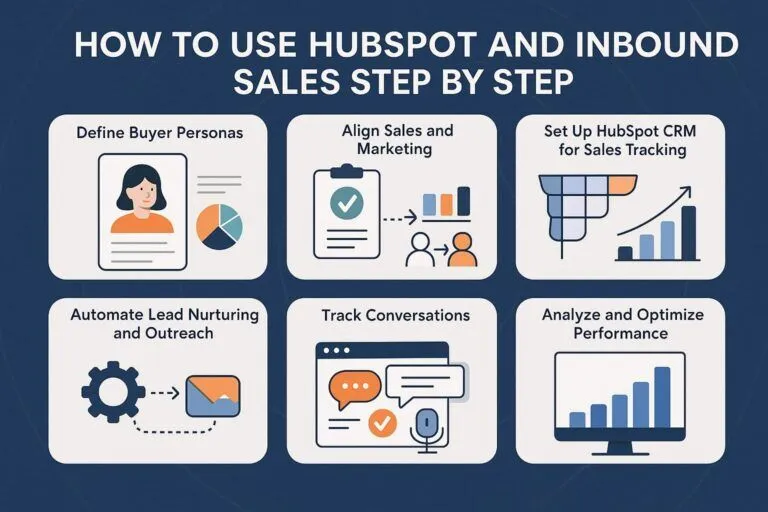
How to Use HubSpot and Inbound Sales Step by Step
Let’s break down how your team can practically implement inbound sales through HubSpot.
Step 1: Define Buyer Personas
Start by identifying who your ideal customers are. HubSpot allows you to create detailed buyer personas complete with their challenges, goals, and motivations.
Real Scenario: Sarah, a SaaS marketing manager, struggled to convert trial users. After setting up personas in HubSpot, she learned that product comparison content drove higher conversions than general blogs.
Step 2: Align Sales and Marketing
Inbound success depends on SMarketing the alignment between sales and marketing. In HubSpot, shared dashboards and deal pipelines make this collaboration natural.
Marketing nurtures leads using email workflows.
Sales receives notifications when leads are ready to engage.
Pro Tip: Use HubSpot’s lifecycle stages (Subscriber → MQL → SQL → Customer) to clearly define lead ownership.
Step 3: Set Up HubSpot CRM for Sales Tracking
HubSpot CRM forms the foundation of your inbound sales strategy. Set up your Sales Hub with custom deal stages, contact properties, and task reminders.
HubSpot CRM tools to use:
Pipeline Management: Track deals visually.
Tasks & Activities: Never miss follow-ups.
Quotes & Payments: Send proposals directly from HubSpot.
Real Scenario: A B2B distributor using spreadsheets shifted to HubSpot CRM and reduced deal slippage by 40%.
Step 4: Automate Lead Nurturing and Outreach
HubSpot allows you to create automation workflows that save hours every week.
Lead Scoring: Assign points based on user behavior.
Task Automation: Auto-create follow-ups for new deals.
Example: An inbound lead downloads a pricing guide. HubSpot scores them high, triggers an automated follow-up email, and notifies a rep to call within 24 hours.
Step 5: Track Conversations with HubSpot Inbox and Extensions
The HubSpot Sales Extension (for Gmail and Outlook) integrates email tracking, meeting links, and CRM logging directly into your inbox.
Use it to:
Get real-time alerts when prospects open emails.
Insert meeting links into messages.
Log emails and calls automatically.
Real Scenario: A rep noticed a prospect opened her email three times in an hour. She followed up immediately and closed a $25,000 deal the same week.
Step 6: Analyze and Optimize Performance
Use HubSpot Sales Analytics to measure what’s working and where deals stall.
Review deal velocity reports to shorten your sales cycle.
Use pipeline forecasting to predict next quarter’s revenue.
Compare rep performance and call outcomes.
Pro Tip: Set up custom dashboards for your sales manager, with filters for deal stage, source, and close rate.
How to Use HubSpot and Inbound Sales: Hub Overview
The HubSpot Sales Hub Overview includes:
Contacts: Manage every interaction.
Deals: Track opportunities visually.
Tasks: Keep follow-ups organized.
Email Tracking: Get notified when prospects engage.
Reports: Measure productivity and revenue.
Together, these features transform your inbound process from guesswork to predictable growth.
How to Use HubSpot and Inbound Sales Difference
Aspect
Inbound Sales
HubSpot Usage
Approach
Methodology for attracting customers
Platform to execute that methodology
Focus
Customer journey and engagement
Tools and automation
Outcome
Builds trust and relationships
Streamlines and scales the process
In short, inbound sales defines what you should do, while HubSpot defines how you do it efficiently.
How to Use HubSpot and Inbound Sales Demo
If you’re new to HubSpot, testing it through a demo environment is a great start.
Create a free HubSpot account.
Explore preloaded sample data in Sales Hub.
Set up a test pipeline, email template, and automation.
Use the activity timeline to see how everything connects.
Expert Tip: Invite team members to the demo to simulate a real sales environment.
How to Use HubSpot and Inbound Sales Extension
The Sales Extension is one of HubSpot’s most underrated tools. It connects directly with your Gmail or Outlook and brings HubSpot CRM into your inbox.
Top Uses:
Track opens, clicks, and replies.
Schedule follow-ups automatically.
Log activities without manual entry.
Real Scenario: A rep using HubSpot’s Chrome extension increased reply rates by 30% by tracking when leads opened proposals and following up at peak engagement times.
Common Challenges People Face and How HubSpot Solves Them
Problem
How HubSpot Helps
Leads drop off after initial contact
Automated nurture workflows re-engage them
Sales team lacks visibility into lead history
Centralized CRM tracks every touchpoint
Inconsistent follow-ups
Task reminders and sequences ensure consistency
Poor marketing-sales alignment
Shared dashboards create unified goals
Forecasting errors
Real-time analytics and deal insights improve accuracy
Why Businesses Choose HubSpot for Inbound Sales
Unified Platform: One tool for CRM, marketing, and service.
Ease of Use: Intuitive dashboards reduce learning time.
Scalable Workflows: Automations grow with your sales process.
Integrations: Connect with tools like Gmail, Slack, Zoom, and more.
Continuous Optimization: AI-driven insights for smarter selling.
Mastering how to use HubSpot and inbound sales means mastering customer relationships. When sales reps use data, automation, and empathy together, results multiply. HubSpot gives your team the structure, visibility, and analytics to convert leads more effectively without losing the human touch.
If you’re ready to transform your inbound sales process, Mpire Solutions can help you design a strategy built on proven HubSpot Sales Hub frameworks and best practices.
FAQs
The “3-3-3 Rule” in marketing refers to a strategy where you focus on three core messages, engage three primary audience segments, and use no more than three channels. This structure helps simplify your campaign, improve clarity, and boost recall.
HubSpot inbound sales is a strategy that focuses on attracting potential buyers through helpful content, personalized outreach, and data-driven insights. Instead of cold calls, it nurtures leads by solving their real problems and building trust.
A sales process outlines the specific steps your team follows to close deals, while an inbound sales strategy in HubSpot focuses on attracting, engaging, and delighting prospects using CRM tools, automation, and analytics to guide them naturally through the buyer’s journey.
HubSpot helps sales teams manage leads, track interactions, automate follow-ups, and analyze performance. Its CRM centralizes all customer data, making it easier to personalize communication, shorten sales cycles, and improve conversion rates.
While HubSpot offers powerful tools, its advanced features can be expensive for small businesses. Some users also find the platform’s customization options limited compared to enterprise CRMs, and integrations may require technical expertise.
I am a certified HubSpot Consultant, Full Stack Developer, and
Integration Specialist with over 15 years of experience successfully transforming
business-critical digital ecosystems. My expertise spans the entire software lifecycle,
ranging from high-performance web application development to managing large-scale
migrations, enterprise-grade CRM integrations, and secure compliance-driven solutions.





 HubSpot Consulting Needs