Book a 30-Minute Call With Our Certified Consultant
Connect directly with our accredited consultant to get clear answers on
your HubSpot underutilized features, integrations, reporting and automation.
In this Consultation, you can discuss:
HubSpot Consulting Needs
Custom Automation Plan
Automation isn’t just optional anymore; it has become a critical requirement. Companies build workflows to reduce manual tasks, improve data accuracy and enhance operational speed. But even with an automation platform as flexible as n8n, users often encounter situations where a specific integration is missing. This is where understanding how to create custom n8n node becomes a powerful advantage. Businesses already using n8n integrations can expand their automation potential by building nodes that align with their unique tools and processes.
Can AI build my custom n8n node without human involvement?
AI can propose concepts, but human refinement is essential for accuracy and functional results.
Why Custom n8n Nodes Exist
Not every platform offers native connectors for the applications a business depends on. Some tools expose hidden APIs, use uncommon authentication methods or are built around legacy systems that do not interact with modern apps. Custom nodes fill these integration gaps and give teams independence from vendor roadmaps and release cycles.
Companies often realize the importance of creating a custom node only when a workflow hits a wall. By designing a node that aligns with business logic, data structures and compliance requirements organizations gain control over their automation ecosystem instead of waiting for external updates.
Real Life Scenarios Highlighting the Need for Custom Nodes
Scenario 1: The Marketing Blocker
A marketing director wants to sync webinar engagement data with HubSpot, but the webinar platform has no native n8n connector. The team spends hours manually exporting spreadsheets, delaying campaign follow-ups. A custom node eliminates this bottleneck and enables real-time lead scoring.
Scenario 2: The ERP Dependency
A manufacturing firm uses an ERP that communicates through outdated formats. Without a ready-made n8n connector, everyday tasks like updating stock levels require human intervention. A custom node solves this recurring operational drag and creates a unified data flow.
Scenario 3: The SaaS Startup Roadmap
A SaaS founder relies on a niche analytics platform with a private API. The business cannot justify switching tools, but the lack of integration limits insights. Creating a custom n8n node enables premium reporting, prevents tool migration and supports growth without infrastructure overhaul.
These examples reflect a common pattern: automation stops when an integration doesn’t exist and custom nodes reignite progress.
Understanding the Concept of a Custom n8n Node
A custom n8n node is an automation building block designed specifically for your organization’s digital environment. Instead of relying on pre-built connectors, businesses define how the node should behave, which systems it connects to and what data it processes. This gives teams the freedom to automate without being restricted by the native app library.
Unlike general workflow steps, a custom node represents a strategic choice. It encapsulates logic, processes and data structures into a reusable component. Once created, it becomes part of the company’s automation toolkit and can be used repeatedly across workflows, departments and even future integrations.
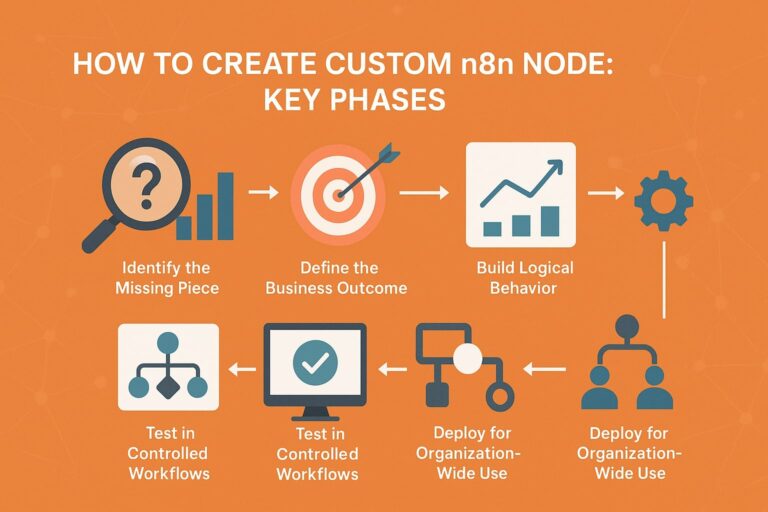
How to Create Custom n8n Node: Key Phases
Creating a custom node requires structured planning rather than random experimentation. Here are the core phases involved:
1. Identify the Missing Piece
Determine what the native nodes cannot do—whether it’s connecting to an exclusive tool, processing data in specific ways or using authentication standards that n8n does not support.
2. Define the Business Outcome
A custom node is worthwhile only if it removes friction. Clear goals, such as integrating an internal CRM or replacing weekly reports, ensure that efforts align with measurable improvements.
3. Build Logical Behavior
The node should reflect actual business usage how users expect data to move, trigger or transform. The more aligned it is with organizational workflows, the more valuable it becomes.
4. Test in Controlled Workflows
Start with a test environment so teams can validate output, optimize performance and avoid disruptions to live processes.
5. Deploy for Organization-Wide Use
Once stable, the node becomes a standard part of the automation ecosystem and can be reused within any workflow that requires the same logic.
Organizations report significant time savings once repetitive tasks are automated. The more complex your digital ecosystem becomes, the more valuable custom nodes are for maintaining continuity and operational flow.
Learning how to create custom n8n node empowers businesses to expand automation beyond native constraints. Instead of waiting for a future integration or restructuring your digital stack, custom nodes give you freedom to connect systems, optimize workflows and evolve operations at your pace. For organizations striving to modernize without losing existing tools, this approach is no longer optional it’s strategic.
If your workflows are hitting integration barriers or you need expert direction, Mpire Solutions helps companies overcome automation limits and navigate the complexities of advanced n8n deployments with confidence.
FAQs
When native nodes cannot support your tools, workflows or authentication methods, a custom node bridges the gap.
They require planning, clarity of purpose and understanding of workflow logic, but they are achievable with structured effort.
Yes. Once created, a custom node becomes reusable throughout the platform.
If your needs are unique, a custom node ensures precision without relying on third-party updates.
Absolutely. They automate repetitive tasks that otherwise consume employee time and delay decision-making.
I am a certified HubSpot Consultant, Full Stack Developer, and
Integration Specialist with over 15 years of experience successfully transforming
business-critical digital ecosystems. My expertise spans the entire software lifecycle,
ranging from high-performance web application development to managing large-scale
migrations, enterprise-grade CRM integrations, and secure compliance-driven solutions.





 HubSpot Consulting Needs
 HubSpot Consulting Needs