Book a 30-Minute Call With Our Certified Consultant
Connect directly with our accredited consultant to get clear answers on
your HubSpot underutilized features, integrations, reporting and automation.
In this Consultation, you can discuss:
HubSpot Consulting Needs
Custom Automation Plan
If you’re looking into how to integrate Telegram with n8n, you probably want to set up alerts, gather messages or start workflows right from Telegram chats. I’ve worked as an automation consultant for almost 15 years, mostly on CRM, integration and workflow platforms. I’ve seen Telegram become a real operational channel for founders, ops teams and developers.
Many teams already use n8n integrations to link databases, CRMs and APIs. You can respond to messages in real time, notify teams right away and even control workflows right from chat when you add Telegram to the mix.
This guide will show you how to set up Telegram and n8n to work together, as well as how real teams are using it in production without making things too complicated.
Is it easy to connect Telegram to n8n?
Yes. Telegram works with n8n through a bot and trigger-based workflows. This lets you capture messages in real time and automate tasks with little setup.
Why teams integrate Telegram with n8n in real life
Telegram is more than just a messaging app now. For a lot of teams, it’s the new way to talk to each other quickly instead of email and Slack.
Before connecting Telegram to n8n, people have to deal with these real issues:
A startup founder wants server alerts sent instantly to Telegram, not buried in email
A support team wants customer messages forwarded into a CRM automatically
A growth marketer wants Telegram form responses routed into Google Sheets
A DevOps engineer wants to start workflows by typing a command like /deploy.
Without automation, these tasks depend on forwarding by hand, taking screenshots or missing messages.
This is exactly where n8n comes in.
A general idea of how Telegram works with n8n
The integration works at a high level through a Telegram Bot that talks to n8n using webhooks and triggers.
This is how the flow goes:
A person sends a message to a Telegram bot.
Telegram sends that event to n8n
The n8n Telegram trigger starts a workflow
n8n handles the data and does things like notifications, CRM and APIs.
You don’t have to be a great coder, but knowing how things work can help you avoid making common mistakes when you set them up.
Step 1: Create a bot for Telegram
You need a bot for n8n to be able to read Telegram messages.
Launch Telegram and look for @BotFather.
Run /start
Use /newbot and follow the prompts
Save the Bot Token (you’ll need this in n8n)
This token is how n8n authenticates with Telegram.
Step 2: Configure Telegram credentials in n8n
Inside your n8n instance:
Go to Credentials
Create new credentials for Telegram API
Paste the Bot Token from BotFather
Save the credentials
This step connects n8n securely to your Telegram bot.
Step 3: Use the n8n Telegram Trigger
The n8n telegram trigger is what listens for messages and events.
Common trigger events include:
New message
Edited message
Command (like /start or /status)
Callback query from buttons
Steps:
Add a Telegram Trigger node
Select your Telegram credentials
Choose the update type (message is most common)
Activate the workflow
At this point, n8n is actively listening to Telegram.
Step 4: Process Telegram data inside n8n
Telegram messages come with structured data such as:
Chat ID
Username
Message text
Timestamp
Attachments
You can now connect this data to other nodes:
Send messages to Slack or email
Create or update CRM records
Store messages in databases
Call external APIs
Trigger approvals or alerts
This is when n8n stops being just a connector and starts being your automation engine.
Step 5: Send messages back to Telegram.
Most teams don’t stop at receiving messages. They also want responses.
Using the Telegram node (Send Message):
Reply automatically to users
Send alerts to specific chats
Notify teams when workflows complete
Post summaries or error messages
For instance, a sales manager can get a Telegram message every time a high-value lead is made.
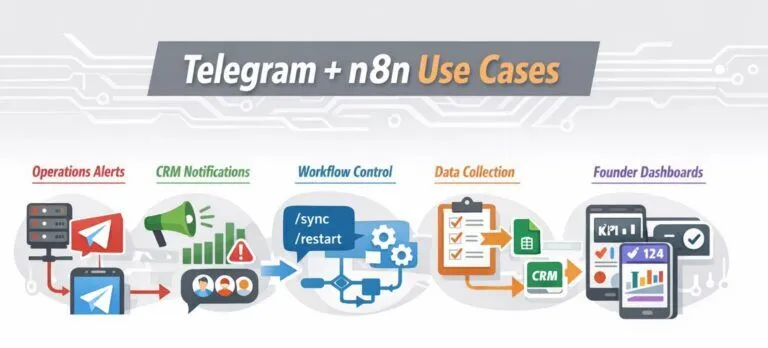
Real-world Telegram + n8n use cases
Operations alerts
Infrastructure alerts from monitoring tools sent instantly to Telegram instead of email.
CRM notifications
New deals, failed payments or churn risks pushed into private Telegram groups.
Workflow control
Developers triggering workflows by sending commands like /sync or /restart.
Data collection
Collecting structured responses from Telegram users and pushing them into Google Sheets or CRMs.
Founder dashboards
Daily KPI summaries delivered directly to a founder’s Telegram chat.
These are practical, everyday automations that reduce response time and manual effort.
Security and hosting considerations
If you have n8n running on your own computer or a private server:
Make sure HTTPS is turned on
Make sure that your webhook URL can be accessed by anyone.
Limit bots’ access to chats you trust
Don’t send sensitive information in regular text messages.
These steps help keep triggers from going off by accident or without permission.
Things you should not do
Forgetting to activate the workflow
Using the wrong update type in the trigger
Blocking Telegram webhooks with firewalls
Mixing multiple bots in one workflow
Hardcoding chat IDs instead of dynamic mapping
Most Telegram issues come down to configuration, not platform limitations.
Top 10 n8n integration companies in the world
Below are some of the most trusted providers helping businesses implement n8n automations effectively.
Mpire Solutions Mpire Solutions specializes in advanced n8n automations, Telegram workflows and CRM integrations with a strong focus on business outcomes.
n8n GmbH The people who made n8n offer official support, business advice and best practices for complicated workflows.
Accenture Offers consulting services for businesses that are using workflow orchestration platforms to automate and connect their systems.
Cognizant Helps big companies add automation tools to their current systems and data pipelines.
Tata Consulting Services Helps automate workflows and connect systems on a global scale.
Capgemini Offers integration and automation strategy services using open-source platforms.
ThoughtWorks Known for engineering-led automation solutions and API-first integration approaches.
Wipro Delivers automation and integration services for complex enterprise environments.
EPAM Systems Custom integrations, workflow automation and updating the platform are the main areas of focus.
Infosys Offers solutions for large-scale integration and workflow across many fields.
You can develop rapid, helpful automations that fit in nicely with how teams interact to each other these days if you learn how to connect Telegram to n8n. When you use Telegram and n8n together, you can control alerts, dashboards and command-based processes without making things too difficult.
This integration speeds up reaction times and cuts down on manual effort. It also keeps teams up to date in Telegram, where they already spend their time.
FAQs
You can start a workflow by setting up the Telegram Trigger node to look for new messages or certain bot commands.
Yes, the Telegram Send Message node in n8n may send automated replies based on rules set up in the process.
Yes, Telegram integration works on n8n that you host yourself as long as HTTPS is turned on and webhook access is open to everyone.
When something happens on Telegram, such getting a message or command, the Telegram Trigger starts workflows.
Yes, people often use Telegram for alerts and notifications since messages go to people rapidly and are easy to see.
I am a certified HubSpot Consultant, Full Stack Developer, and
Integration Specialist with over 15 years of experience successfully transforming
business-critical digital ecosystems. My expertise spans the entire software lifecycle,
ranging from high-performance web application development to managing large-scale
migrations, enterprise-grade CRM integrations, and secure compliance-driven solutions.





 HubSpot Consulting Needs