Book a 30-Minute Call With Our Certified Consultant
Connect directly with our accredited consultant to get clear answers on
your HubSpot underutilized features, integrations, reporting and automation.
In this Consultation, you can discuss:
HubSpot Consulting Needs
Custom Automation Plan
How to Change Deal Stages in HubSpot
Managing your sales pipeline effectively is crucial for improving conversion rates and forecasting revenue. As a HubSpot Agency, we know that customizing deal stages can help align your CRM with your business unique sales process. In this guide, you’ll learn exactly how to change deal stages in HubSpot, rename them and modify lifecycle stages for optimal tracking.
Understanding Deal Stages in HubSpot
Before making changes, it’s important to understand what deal stages represent.
Deal Stages are specific steps in your sales pipeline that track the progress of a deal from initial contact to closing.
Each stage typically reflects a measurable step, such as “Contact Made,” “Demo Scheduled” or “Negotiation.”
Adjusting these stages ensures that your pipeline mirrors your actual sales workflow.
Why You Might Need to Change Deal Stages
You should update deal stages if:
Your sales process has evolved and now requires different steps.
You’ve identified bottlenecks or unnecessary stages.
You’re aligning your pipeline with new business strategies or industry changes.
Step-by-Step: How to Change Deal Stages in HubSpot
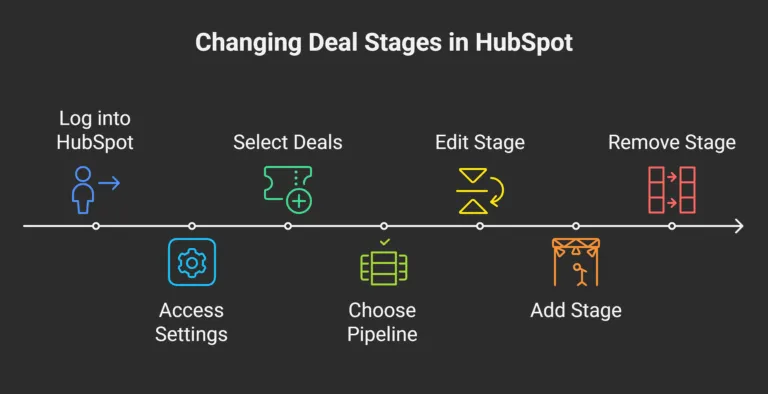
Follow these steps to edit, remove or add deal stages in HubSpot.
Step 1: Access Your Deal Pipeline Settings
Log into your HubSpot account.
Click the Settings (gear) icon located in the upper-right corner.
From the left sidebar, go to Objects > Deals.
Step 2: Select the Pipeline You Want to Edit
In the Pipelines tab, select the sales pipeline you want to edit.
Each pipeline has its own set of deal stages.
Step 3: Edit an Existing Deal Stage
Click on the stage name you want to change.
Update the name, probability percentage and any other relevant details.
Step 4: Add a New Deal Stage
Click + Add stage at the bottom of the pipeline list.
Name the stage, assign a probability and save.
Step 5: Remove a Deal Stage
Hover over the stage you want to delete.
Click Delete and confirm your action.
How to Change Deal Stage Names in HubSpot
If you only want to rename a stage:
Go to Settings > Deals > Pipelines.
Click on the stage you want to rename.
Enter the new name and save your changes.
How to Change Lifecycle Stages in HubSpot
Lifecycle stages track where a contact, company or deal is in your broader customer journey (e.g., Subscriber, Lead, Opportunity, Customer).
To update lifecycle stages:
Navigate to Settings > Properties.
Search for “Lifecycle Stage.”
Edit the available values or change the stage for specific records manually.
Best Practices for Managing Deal Stages
Keep stage names short and clear.
Avoid having too many stages 5 to 7 is ideal.
Review your stages quarterly to ensure they still reflect your sales process.
Align stage probability percentages with historical conversion rates for better forecasting.
Common Issues When Changing Deal Stages
Losing Data: Deleting a stage can cause historical data loss. Always export reports first.
Team Misalignment: Ensure sales teams are trained on any new changes.
Pipeline Clutter: Excess unused stages can hinder reporting accuracy and make CRM navigation slower.
Conclusion
Changing deal stages in HubSpot is a simple but powerful way to improve pipeline visibility and sales efficiency. Whether you’re renaming stages, adding new ones or adjusting lifecycle stages, keeping your pipeline updated ensures your CRM reflects your real-world sales process.
For expert assistance with HubSpot customization, integration and optimization, our Agency team at Mpire Solutions is here to help.
FAQs
1. How do I change deal stage names in HubSpot? Navigate to Settings > Deals > Pipelines, select the stage to rename, edit the name and save your changes.
2. Can I have different deal stages for different pipelines? Yes. Each pipeline can have its own unique set of deal stages.
3. What’s the difference between deal stages and lifecycle stages in HubSpot? Deal stages track sales opportunities, while lifecycle stages track the overall relationship with a contact or company.
4. Will changing a deal stage affect my reports? Yes. Changing or deleting stages can impact historical reporting, so always back up data first.
5. How often should I review my deal stages? It’s recommended to review and adjust deal stages at least once every quarter.
I am a certified HubSpot Consultant, Full Stack Developer, and
Integration Specialist with over 15 years of experience successfully transforming
business-critical digital ecosystems. My expertise spans the entire software lifecycle,
ranging from high-performance web application development to managing large-scale
migrations, enterprise-grade CRM integrations, and secure compliance-driven solutions.





 HubSpot Consulting Needs