Book a 30-Minute Call With Our Certified Consultant
Connect directly with our accredited consultant to get clear answers on
your HubSpot underutilized features, integrations, reporting and automation.
In this Consultation, you can discuss:
HubSpot Consulting Needs
Custom Automation Plan
Understanding how HubSpot works has become essential for companies striving to improve customer journeys, automate repetitive tasks and bring marketing and sales activities under one system. Whether you’re evaluating HubSpot for the first time or searching for ways to maximize its capabilities, this guide breaks down its structure, modules, integrations and real-world use cases.
As a HubSpot agency, we frequently meet founders, marketing leads and sales directors who feel overwhelmed with fragmented tools, missing data and inconsistent customer engagement. HubSpot tackles exactly these pain points through a unified approach that helps businesses move from scattered spreadsheets to predictable revenue operations.
How does HubSpot work?
HubSpot works by combining CRM, marketing, sales and service tools into one unified platform that connects data, automates tasks and aligns teams for better customer experiences.
Understanding the HubSpot Ecosystem
HubSpot is not a single tool—it is a connected suite of hubs that share a unified CRM database:
CRM Hub for customer records and pipeline visibility
Marketing Hub to attract traffic and convert leads
Sales Hub for deal tracking and outreach automation
Service Hub for customer ticketing and feedback
Operations Hub for workflow automation and data sync
CMS Hub for websites and landing pages
Each hub solves a different business function while feeding into a central source of truth.
How HubSpot Works Step by Step
1. Data Enters HubSpot
Customer information flows into HubSpot through website forms, chat widgets, imports, ads, emails or manual entry.
Real Scenario: A startup founder managing leads in Google Sheets misses 30% of follow-ups. After forms auto-sync into HubSpot, the system reminds reps to call every lead, reducing leaks in the funnel.
2. HubSpot Tracks Every Interaction
Once the data enters, HubSpot logs emails, calls, meetings, page views, ads engagement and deal movements.
This eliminates blind spots like:
“Did someone from sales reach out?”
“Has the customer opened our proposal?”
“Why did we lose that deal?”
3. Automated Workflows Improve Consistency
HubSpot triggers automated emails, sales tasks, SMS reminders and deal updates. A sales rep no longer spends hours following up manually.
4. Sales Pipeline Visibility
From a single dashboard, sales managers track every deal, forecast revenue and identify bottlenecks.
5. Reporting and Attribution
HubSpot identifies which channels generate leads and which campaigns waste budget.
Real Scenario: An eCommerce brand spent heavily on social ads but saw no ROI. HubSpot reporting revealed that organic search drove 60% of sales, redirecting budget to SEO and blogs.
How HubSpot CRM Works
HubSpot CRM is the core engine that stores contacts, companies, deals and support tickets. It shows a timeline of customer touchpoints and helps teams understand buyer behavior without spreadsheets.
Common CRM Pain Points Solved:
Before HubSpot
After HubSpot
Scattered data in sheets
Centralized CRM data
Guessing next steps
Automated tasks & reminders
No insight into sales
Detailed pipeline forecasting
Email history missing
Logged communication
Real Scenario: A SaaS sales team dealt with lost emails and confused ownership. After HubSpot CRM adoption, each rep had complete conversation history and deal notes in one place.
How Does HubSpot Work With Salesforce?
Many mid-market and enterprise firms use Salesforce but rely on HubSpot for marketing automation. HubSpot syncs contacts, deals and activities bi-directionally with Salesforce so marketing teams can nurture leads before handing them to sales.
Why this matters: Without syncing, marketing generates leads that sales rarely sees and revenue performance becomes unpredictable.
How Does HubSpot Work With Outlook?
HubSpot integrates directly with Outlook, letting users:
Track email opens and clicks
Log messages into CRM automatically
Schedule meetings from inbox
Access customer details without leaving Outlook
Real Scenario: A real estate agency used Outlook heavily but forgot to follow up with inquiries. After connecting HubSpot, reminders auto-triggered when prospects didn’t reply, increasing conversions.
Core Benefits of Understanding How HubSpot Works
Reduced Manual Effort
HubSpot automates repetitive tasks so teams focus on high-value conversations.
Aligned Teams
Marketing generates leads, sales converts them, customer service supports them—on one shared platform.
Better Customer Journeys
Each touchpoint builds context, preventing repeated questions like:
“Have we spoken before?”
Predictable Revenue
Leaders forecast accurately instead of making assumptions.
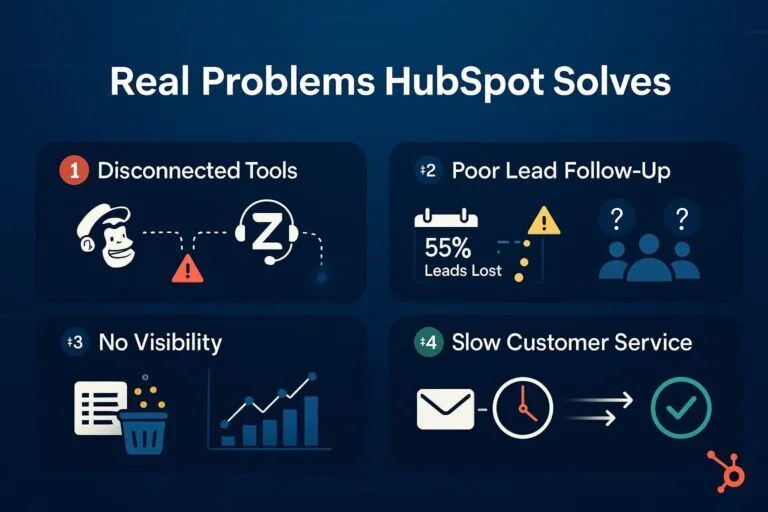
Real Problems HubSpot Solves
1. Disconnected Tools
Businesses use Mailchimp for emails, Zendesk for support, Google Sheets for sales. HubSpot removes tech silos.
2. Poor Lead Follow-Up
Research shows companies lose up to 55% of leads due to no process. HubSpot triggers reminders and automations.
3. No Visibility
Leadership can’t see which rep owns which deal. HubSpot provides a live dashboard of activities and deal stages.
4. Slow Customer Service
Ticket routing ensures the right agent responds without delays.
If your teams struggle with communication, missed leads or manual reporting HubSpot fixes the root cause.
Is HubSpot Easy to Learn?
Yes. The interface is intuitive and users often become productive within weeks. The challenge isn’t learning HubSpot; it’s configuring it according to business needs, which is why many firms hire certified consultants.
Knowing how HubSpot works helps companies eliminate scattered systems and build unified customer journeys. The platform gives marketing, sales and service teams a single place to manage leads, nurture prospects, measure performance and scale revenue operations effectively.
Companies embracing HubSpot consistently report faster follow-ups, more transparent pipelines and improved buyer experiences. If you’re exploring implementation, migration or CRM enhancement, partnering with an experienced HubSpot consultancy is often the smartest first step.
FAQs
HubSpot is a CRM and marketing automation platform used to manage customer relationships, run sales pipelines, automate marketing campaigns, track leads and support customer service teams all in one place.
HubSpot started as a CRM, but now includes a CMS, marketing, sales and service hubs under one platform.
HubSpot offers an all-in-one platform, an intuitive interface, built-in automation and strong integrations that help businesses attract leads, manage sales and improve customer communication.
HubSpot can become expensive as your team grows, some advanced features are locked behind higher-tier plans and customization options are limited compared to enterprise-level platforms.
Yes, HubSpot is beginner-friendly thanks to its clean interface and extensive tutorials, making it easier for users to adopt compared to more complex CRM systems.
I am a certified HubSpot Consultant, Full Stack Developer, and
Integration Specialist with over 15 years of experience successfully transforming
business-critical digital ecosystems. My expertise spans the entire software lifecycle,
ranging from high-performance web application development to managing large-scale
migrations, enterprise-grade CRM integrations, and secure compliance-driven solutions.





 HubSpot Consulting Needs