Book a 30-Minute Call With Our Certified Consultant
Connect directly with our accredited consultant to get clear answers on
your HubSpot underutilized features, integrations, reporting and automation.
In this Consultation, you can discuss:
HubSpot Consulting Needs
Custom Automation Plan
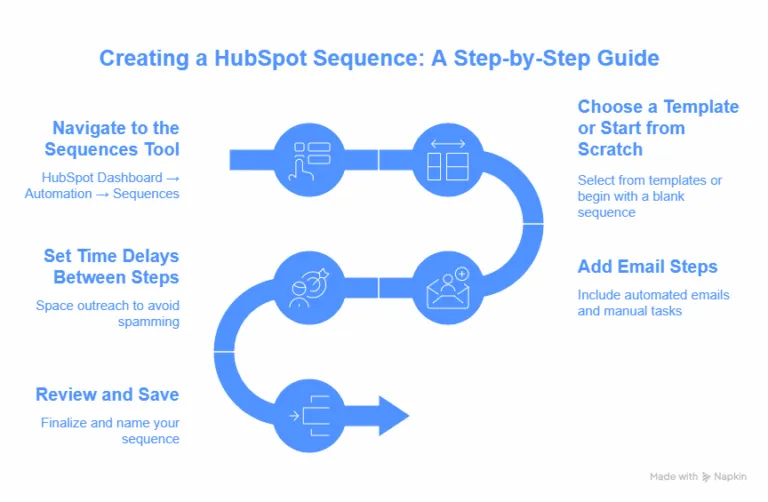
If you’re navigating the world of sales enablement, knowing how to create a sequence in HubSpot is one of the most valuable skills you can master.
Whether you’re trying to scale outreach, follow up with prospects, or automate your nurturing campaigns, HubSpot Sequences offer the best ways to stay consistent without sounding robotic.
HubSpot Sequences vs Workflows: What’s the Difference?
Feature
Sequences
Workflows
Purpose
Sales follow-ups
Marketing automation
Audience
Individual leads
Lists, segments
Channels
Email, task reminders
Email, SMS, property updates, more
Personalization
1:1
1:many (with segmentation)
Auto-stop on reply?
✅ Yes
❌ No
Use sequences for lead follow-ups and workflows for bulk nurturing or internal automation.
How Many Contacts Can You Enroll in a Sequence HubSpot?
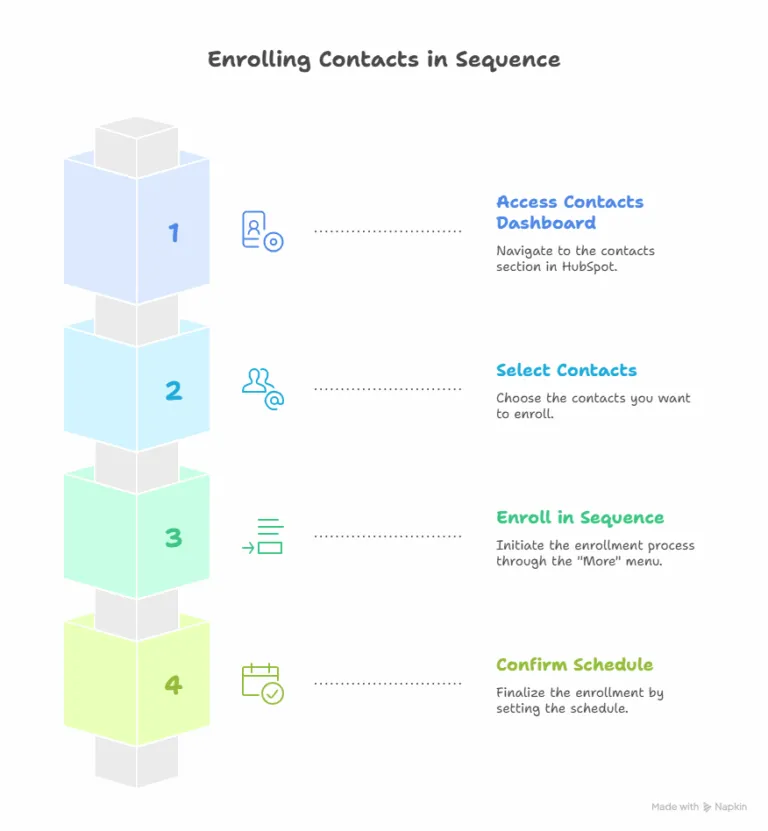
If you’re wondering how many contacts you can enroll in a sequence HubSpot, the answer depends on your subscription:
HubSpot Sales Hub Pro
500 contacts/day per user
Sales Hub Enterprise
Up to 1,000 contacts/day per user
But quantity isn’t everything — the magic is in personalization.
HubSpot Sequence Examples That Convert
Here are a few proven HubSpot sequence examples used by high-performing sales teams:
Cold Outreach (4 steps)
Day 1 – Personalized intro email
Day 3 – Follow-up with added value (link to a blog or case study)
Day 7 – Manual task: connect on LinkedIn
Day 10 – Breakup email (“Should I close your file?”)
Demo No-Show Follow-up (3 steps)
Day 0 – “Sorry we missed you” email
Day 2 – Rebooking link
Day 5 – Task to call or message
HubSpot Dynamic Sequences: The Future of Personalization
While not available out-of-the-box as “true” dynamic sequences, you can build pseudo-dynamic sequences by:
Using branching logic via workflows (to push into different sequences)
Creating custom properties that trigger different sequences
Segmenting contacts by behavior or persona before enrollment
HubSpot is rumored to enhance this feature in future updates. Stay tuned.
HubSpot Sequences Best Practices
To get the most out of sequences, follow these best practices:
1. Personalize Every Step
Use personalization tokens, but also customize each message with context. Mention their company, recent funding, or a shared interest.
2. Keep Subject Lines Short
Avoid salesy language. Subject lines like “Quick question, {{First Name}}” tend to perform well.
3. Test, Analyze, Repeat
A/B test your sequences — try different messaging angles or timings.
4. Avoid Spamming
Don’t overload your sequences. 3–5 steps max. Respect recipient inboxes.
5. Always Add Value
Each step should deliver value — whether it’s insights, resources, or a relevant question.
Common Mistakes to Avoid
Enrolling unqualified leads.
Overusing templates without customizing.
Forgetting to pause sequences when prospects reply.
Using long paragraphs — keep emails scannable.
Final Thoughts
Now that you know how to create a sequence in HubSpot, you’re equipped to scale your outreach without sacrificing the human touch. Sequences can supercharge your sales productivity — when built and used correctly.
If you’re ready to implement dynamic HubSpot sequences that convert, but need strategic support or help building them from scratch, Mpire Solutions can help.
As a HubSpot Gold Partner, we specialize in crafting high-performance sequences tailored to your industry and buyer personas.
Enroll Contacts in Sequence HubSpot – FAQs
How do I Create an order in HubSpot?
HubSpot Sequences are sales tools for personalized, one-to-one email outreach, manually enrolled for targeted follow-ups. Workflows are marketing tools for automated, one-to-many campaigns, triggered by specific actions or criteria.
How do I Create a sequence in HubSpot free?
HubSpot Sequences are not available in the free plan; they require a Sales Hub Starter, Professional, or Enterprise subscription. To create one, you’d need to upgrade, then navigate to Automation > Sequences, click “Create Sequence,” and follow the prompts to set up emails and tasks.
What is the sequences feature in HubSpot CRM?
HubSpot Sequences is a sales automation tool in HubSpot CRM for sending personalized, one-to-one email follow-ups and tasks to nurture leads. It’s available in Sales Hub Starter, Professional, or Enterprise plans, not in the free version.
I am a certified HubSpot Consultant, Full Stack Developer, and
Integration Specialist with over 15 years of experience successfully transforming
business-critical digital ecosystems. My expertise spans the entire software lifecycle,
ranging from high-performance web application development to managing large-scale
migrations, enterprise-grade CRM integrations, and secure compliance-driven solutions.





 HubSpot Consulting Needs
 HubSpot Consulting Needs