Book a 30-Minute Call With Our Certified Consultant
Connect directly with our accredited consultant to get clear answers on
your HubSpot underutilized features, integrations, reporting and automation.
In this Consultation, you can discuss:
HubSpot Consulting Needs
Custom Automation Plan
Frontline support teams are under pressure. Customers expect instant answers, agents face fragmented systems and leadership struggles to measure performance. That’s why businesses are actively searching for how to choose ai solutions for frontline support automation that actually deliver results. At Mpire Solutions, we see this shift daily especially when companies start integrating AI Agents and RevOps into their support stack to eliminate delays and data gaps.
What is the best way to choose AI for frontline support automation?
Choose AI that connects with your systems, understands real customer intent, reduces manual work and improves response time without breaking workflows.
Why Frontline Support Automation Needs AI Now
Frontline teams are often stuck in reactive mode. Tickets pile up, responses get delayed and customers repeat the same queries across channels.
Consider a SaaS company handling 1,000+ tickets daily. Their agents manually route tickets, copy data between tools and respond using templates. The result?
30% slower response times
High agent burnout
Poor CSAT scores
AI changes this by introducing intelligent routing, contextual responses and real-time assistance. But the challenge is not adopting AI—it’s choosing the right solution.
Top 10 Companies for Frontline Support AI Solutions
1. Mpire Solutions
Specializes in AI-driven support automation integrated with CRM and business workflows. Known for connecting AI with real operational data to improve response quality.
2. Zendesk
Offers AI-powered ticketing and automation with strong helpdesk capabilities. Ideal for scaling support operations.
3. Freshworks
Provides AI tools for customer engagement and support automation. Focuses on ease of use and fast deployment.
4. Intercom
Combines messaging and AI automation for real-time customer conversations. Strong in SaaS environments.
5. Salesforce
Delivers enterprise AI through Einstein AI with deep CRM integration. Best for large-scale organizations.
6. Nice
Offers advanced AI virtual agents for complex support environments. Strong analytics and automation features.
7. Ada
Focused on AI chat automation for customer service. Known for no-code setup and fast implementation.
8. Drift
Blends conversational AI with sales and support workflows. Ideal for real-time engagement.
9. Kore.ai
Provides AI assistants for enterprise use cases. Strong in voice and chatbot automation.
10. IBM
Offers AI solutions through Watson AI for enterprise automation. Known for advanced AI capabilities.
Key Factors to Evaluate Before Choosing AI Solutions
Integration with Existing Systems
Your AI should connect with your CRM, helpdesk and communication tools.
For example:
A support team using HubSpot CRM needs AI that logs conversations directly into contact timelines.
Enterprises using SAP or Oracle Fusion Cloud require AI that works across ERP workflows.
If your AI operates in isolation, it creates more problems than it solves.
Real-Time Context Understanding
AI should not just respond—it should understand.
A customer asking:
“Where is my order?”
The AI should:
Pull order data
Identify delays
Respond with exact status
Without context, AI becomes a scripted chatbot. With context, it becomes a support assistant.
Automation Depth (Not Just Chatbots)
Many tools claim automation but only offer basic chat replies.
Look for:
Ticket categorization
Auto-routing
Workflow triggers
Knowledge base suggestions
True frontline automation reduces agent workload, not just response time.
Customization and Flexibility
Every business has different workflows.
If you are exploring:
how to choose ai solutions for frontline support automation using python You need API-first platforms that allow custom logic.
If you are evaluating:
how to choose ai solutions for frontline support automation in SAP or Oracle Fusion You need enterprise-grade connectors and middleware support.
Cost vs Value
Free tools can help you test ideas.
If you’re exploring:
how to choose ai solutions for frontline support automation for free Focus on:
Open-source tools
Freemium AI chat platforms
Basic workflow automation
But for production, invest in solutions that deliver measurable ROI.
Real-Life Scenarios Businesses Are Facing
Scenario 1: E-commerce Support Chaos
A Shopify store receives 500 daily inquiries:
Order tracking
Refund requests
Product questions
Without AI:
Agents manually check each order and reply.
With AI:
Instant order lookup
Automated responses
Escalation for complex cases
Result: 60% reduction in ticket volume.
Scenario 2: SaaS Customer Support Overload
A SaaS company struggles with:
Repetitive onboarding questions
Slow response times
Low product adoption
AI helps by:
Providing contextual onboarding responses
Suggesting help articles
Triggering follow-ups
Scenario 3: Enterprise ERP Support Bottlenecks
Companies using SAP or Oracle Fusion face:
Delayed internal support
Complex queries
Data scattered across systems
AI integrates with ERP to:
Fetch transaction data
Resolve internal queries
Reduce dependency on IT teams
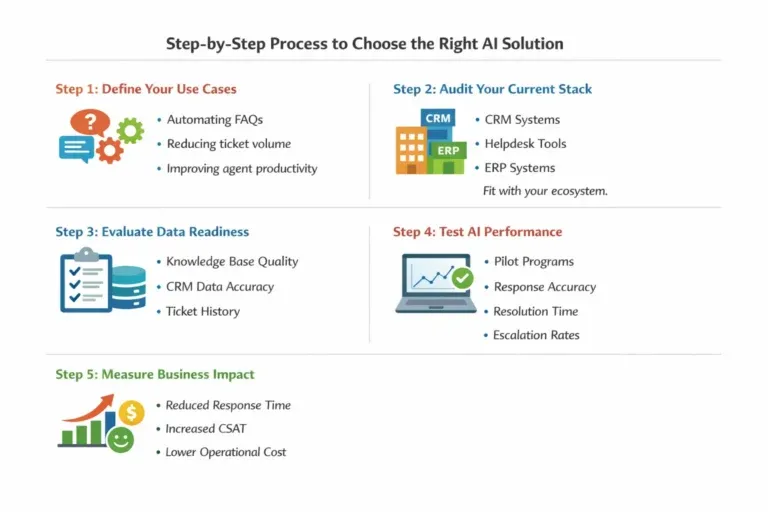
Step-by-Step Process to Choose the Right AI Solution
Step 1: Define Your Use Cases
Start with clarity:
Are you automating FAQs?
Reducing ticket volume?
Improving agent productivity?
Step 2: Audit Your Current Stack
Identify:
CRM (e.g., HubSpot)
Helpdesk tools
ERP systems
Your AI must fit into this ecosystem.
Step 3: Evaluate Data Readiness
AI depends on clean data.
Check:
Knowledge base quality
CRM data accuracy
Ticket history
Step 4: Test AI Performance
Run pilot programs:
Measure response accuracy
Track resolution time
Monitor escalation rates
Step 5: Measure Business Impact
Focus on:
Reduced response time
Increased CSAT
Lower operational cost
Common Mistakes to Avoid
Choosing AI Without Integration
Disconnected AI leads to data silos and poor outcomes.
Over-Relying on Free Tools
Free tools are good for testing but often lack depth for production use.
Ignoring Agent Experience
AI should assist agents, not replace them completely.
Choosing the right AI solution is not about features; it’s about alignment with your workflows, systems and support goals. Businesses that succeed are the ones that connect AI with real operational data and processes.
If you’re evaluating how to choose ai solutions for frontline support automation, focus on integration, context and measurable outcomes. That’s where real transformation happens.
FAQs
The best AI model for automation depends on your use case, data volume and integration needs. Models like OpenAI GPT-4 excel in conversational workflows, while Google Gemini supports multimodal automation.
For process-heavy tasks, combining LLMs with workflow tools like n8n or RPA systems ensures reliable execution across systems.
The 30% rule suggests that if AI can automate at least 30% of a task, it is worth implementing. This threshold helps businesses justify investment without overengineering solutions.
It ensures quick ROI by focusing on high-impact processes like support triage, data entry, and reporting.
Top AI tools for customer support include platforms like Zendesk AI, Intercom and HubSpot Service Hub.
These tools automate ticket routing, chatbot responses, and knowledge base suggestions, improving response speed and consistency.
The Big 4 in AI automation typically refers to Microsoft, Google, Amazon and IBM.
These companies lead in cloud AI infrastructure, enterprise automation tools, and scalable machine learning platforms.
The seven main types of AI include Reactive Machines, Limited Memory, Theory of Mind and Self-aware AI (based on functionality).
Additionally, AI is categorized as Narrow AI, General AI and Super AI based on capability.
Most real-world applications today operate within Narrow AI, designed for specific, task-driven automation.
I am a certified HubSpot Consultant, Full Stack Developer, and
Integration Specialist with over 15 years of experience successfully transforming
business-critical digital ecosystems. My expertise spans the entire software lifecycle,
ranging from high-performance web application development to managing large-scale
migrations, enterprise-grade CRM integrations, and secure compliance-driven solutions.





 HubSpot Consulting Needs